Every screen in the shipping macOS build — 17 of them, grouped by what you are doing. 9 are rendered by the app itself from a demo show; 8 were captured on a rig with a Pioneer CDJ-3000 physically connected. None of it is a mock-up.
The room, and its clock
Everything downstream depends on CueSync knowing what time it is. These are the surfaces that establish it — from a CDJ on PRO DJ LINK to SMPTE timecode ranked against four other sources.
CueSync/Operator View
Output health for four consoles, the master CDJ-3000 on air and in sync at 128 BPM, and the next GO cues queued.CueSync's DJ operator view: output health for grandMA3, Resolume Arena, QLab 5 and ETC Eos all live, with TouchDesigner held and flagged for a reset; the master CDJ-3000 deck on air and in sync at 128.0 BPM over a phrase-labelled waveform; a Next GO card naming the cues queued for Run Mode; a bank of cue pads under a Main Show pager with GO and RESET beside them; and the navigation bar carrying live counts for Cues, CuePads and Palette.
CueSync/Pro Decks
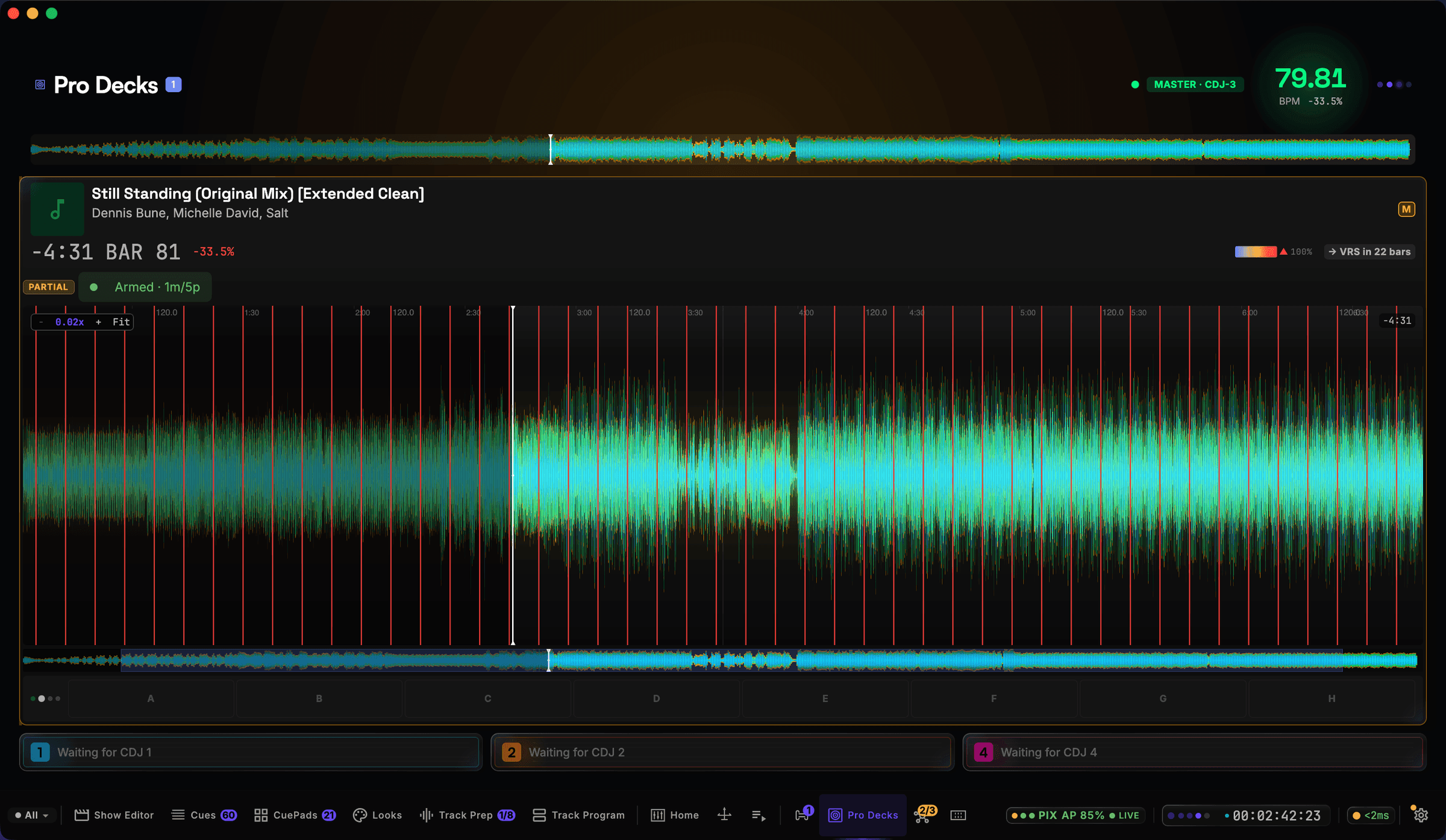
Captured live from a connected Pioneer CDJ-3000 — not a mock-up or a render.
The three-band waveform streamed off the player itself — BAR 81, the A–H hot-cue lane, and 79.81 BPM because the pitch fader was at −33.5%.CueSync's Pro Decks screen, photographed against a connected Pioneer CDJ-3000: the three-band waveform streamed from the player itself with the beat grid drawn over it, 'Still Standing (Original Mix) [Extended Clean]' by Dennis Bune, Michelle David and Salt on air at BAR 81 with -4:31 remaining, the tempo readout at 79.81 BPM because the DJ was holding the pitch fader at -33.5% of a 120 BPM track, a PARTIAL analysis badge beside 'Armed - 1m/5p', the next phrase called as 'VRS in 22 bars' from rekordbox's own phrase data, the A-H hot-cue lane under the waveform, and the three empty player slots reading 'Waiting for CDJ 1', '2' and '4' because this rig ran a single deck. Screen capture of the running app driven by a physically connected Pioneer CDJ-3000 (firmware 3.20, player 3, tempo master) over PRO DJ LINK on a link-local link, rekordbox USB mounted, 2026-08-30. Not a mock-up.
CueSync/Deck Strip
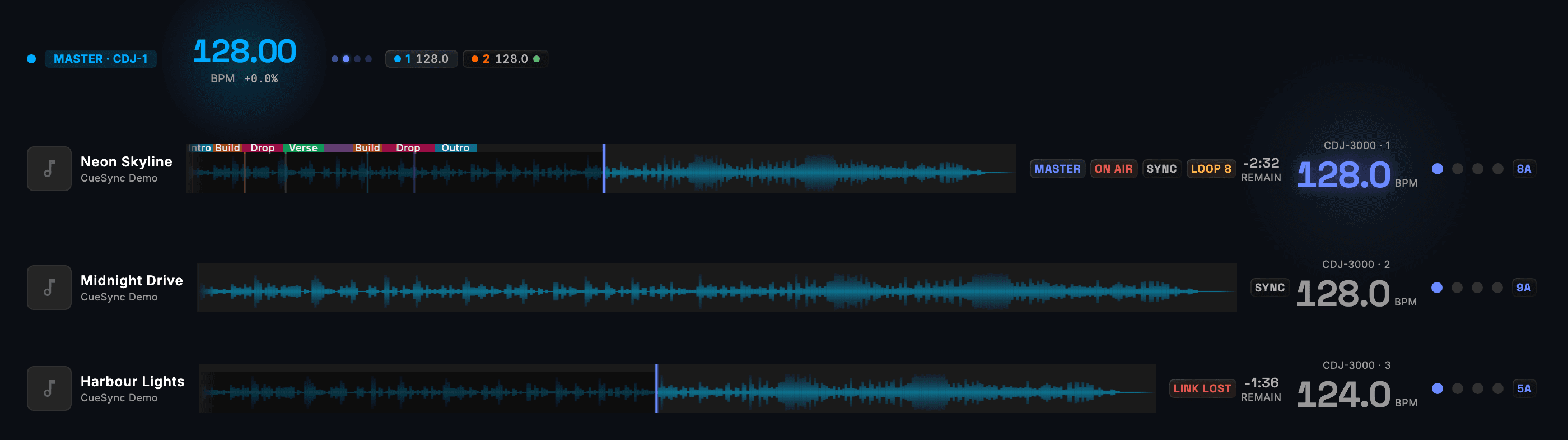
Three players: one on air as tempo master, one cued and already synced, and one carrying LINK LOST with its last known BPM rather than a stale reading.CueSync's deck strip: the master header showing 128.00 BPM with its beat glow and the connected CDJ-3000s, above three players — player 1 playing Neon Skyline as tempo master, on air, in sync, in an 8-beat loop with 2:32 remaining over a phrase-labelled waveform; player 2 cued on Midnight Drive and already synced; and player 3 on Harbour Lights carrying a LINK LOST badge with its last known 124.0 BPM rather than a stale reading.
CueSync/Timecode
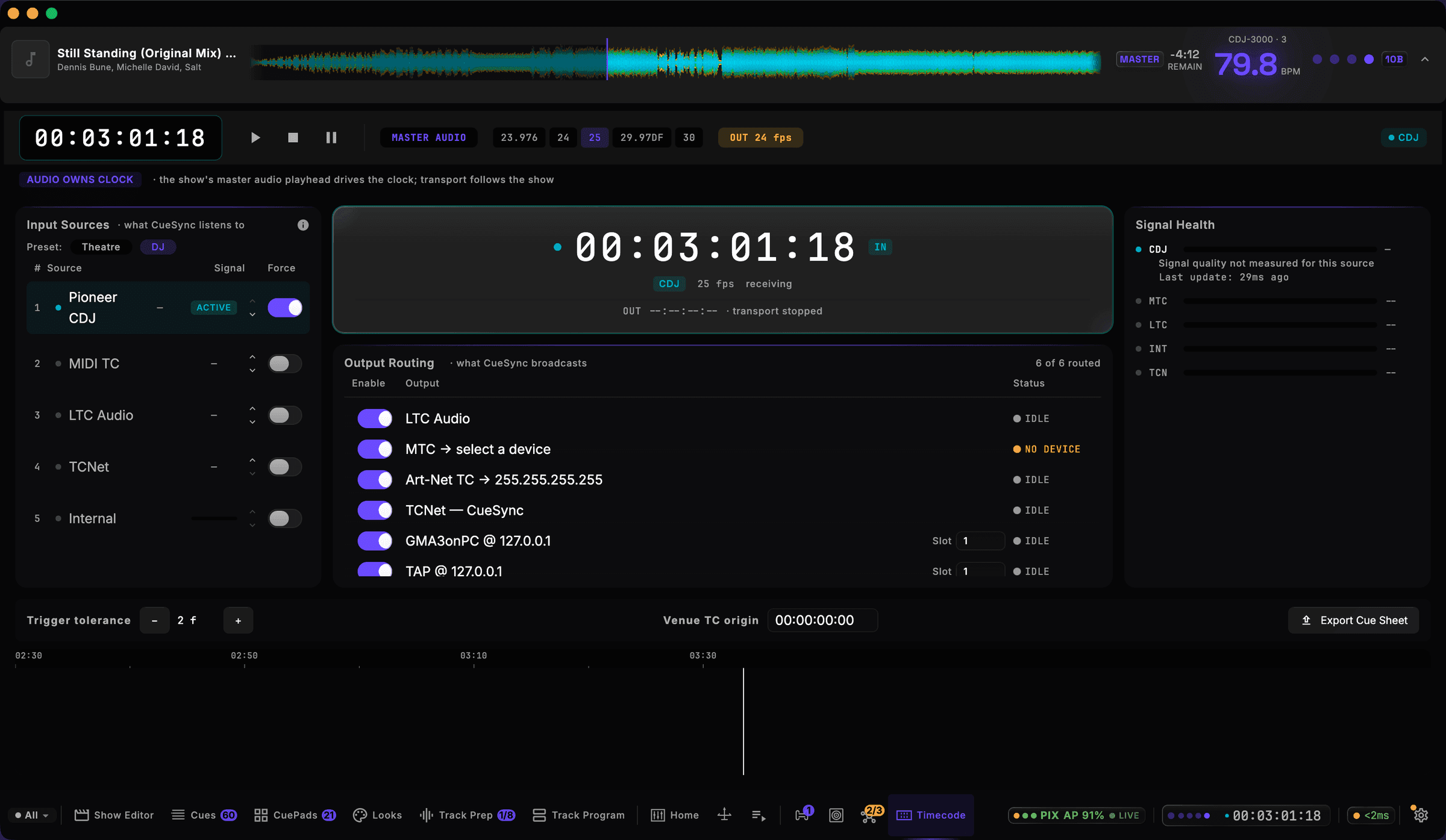
Captured live from a connected Pioneer CDJ-3000 — not a mock-up or a render.
The Pioneer CDJ ranked ACTIVE above MIDI TC, LTC Audio, TCNet and Internal, with six of six outputs routed and MTC honestly reading NO DEVICE.CueSync's Timecode screen on a live rig: the master transport reading 00:03:01:18 with frame rates from 23.976 to 30 selectable and 25 fps chosen, an 'AUDIO OWNS CLOCK' banner explaining that the show's master audio playhead drives the clock and the transport follows the show, an Input Sources column ranking what CueSync listens to with the Pioneer CDJ ACTIVE above MIDI TC, LTC Audio, TCNet and Internal, the generated clock receiving from the CDJ at 25 fps, an Output Routing panel at six of six routed - LTC Audio, MTC, Art-Net TC broadcast to 255.255.255.255, TCNet, GMA3onPC and TAP - with MTC the one row reading NO DEVICE because no MIDI destination was chosen, a Signal Health column, and a trigger tolerance of 2 frames beside the venue timecode origin. Screen capture of the running app driven by a physically connected Pioneer CDJ-3000 (firmware 3.20, player 3, tempo master) over PRO DJ LINK on a link-local link, rekordbox USB mounted, 2026-08-30. Not a mock-up.
Writing the show
Two editors, one idea: cues live against the music, on a ruler every department shares. A DJ set is authored on the track; a theatre show is authored on the timeline.
CueSync/Track Prep
The Score Canvas — energy overlay, phrase-coloured section bands and hot-cue markers — over four cues that each name the grandMA3 cue they fire.CueSync's Track Prep editor shell: the Score Canvas waveform with energy overlay, phrase-coloured section bands and hot-cue markers, above a cue list where each cue (First Drop Blinder, Pre-Drop Strobe, Breakdown Wash, Final Drop) fires on GO and names the grandMA3 cue it triggers, and the audio transport below.
CueSync/Show Editor
The master waveform over a timecode ruler, with snap and transport controls and three colour-coded output lanes carrying numbered cue markers.CueSync's Show Editor multitrack timeline: the master waveform over a timecode ruler with snap and transport controls, and three color-coded output lanes carrying numbered cue markers.
CueSync/Show Editor
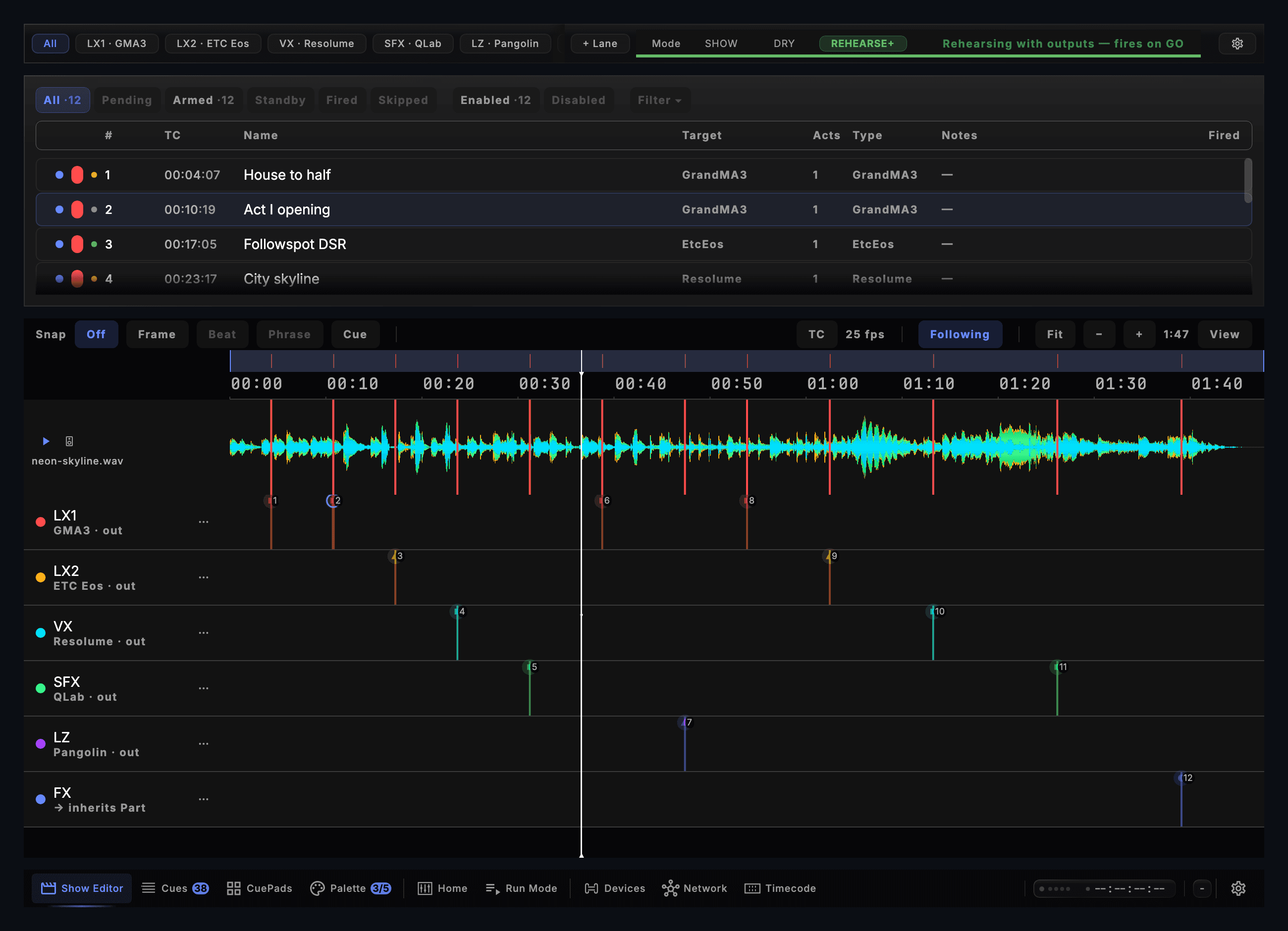
Six lanes on one timeline, each routed to its own desk, beside a cue list showing every cue's number, timecode and readiness.CueSync's Show Editor, the whole screen: the lane filter with LX1, LX2, VX, SFX and LZ chips and a + Lane control beside the SHOW / DRY / REHEARSE+ switch, set to REHEARSE+ and reading 'Rehearsing with outputs — fires on GO'; the cue list with its Pending, Armed, Standby, Fired and Skipped filters and each cue's number, timecode, target and type; and below it a timecode-ruled timeline over the master waveform with six output lanes, each naming its own console target (GMA3, ETC Eos, Resolume, QLab, Pangolin, and one inheriting its Part's routing), twelve cues placed across them.
CueSync/Show Editor
The timeline panel alone: one ruler from 00:00 to 01:40 over the master waveform, and six lanes naming the desk each one goes out to — grandMA3, ETC Eos, Resolume, QLab, Pangolin.CueSync's Show Editor, cropped to the timeline panel where the cues are placed: the Snap toolbar with Off selected beside Frame, Beat, Phrase and Cue, TC at 25 fps with the view Following the playhead and the show's 1:47 duration; a timecode ruler running 00:00 to 01:40 over the master waveform of neon-skyline.wav; and six output lanes below it, each naming the console it goes out to — LX1 to GMA3, LX2 to ETC Eos, VX to Resolume, SFX to QLab, LZ to Pangolin, and FX inheriting its Part's routing — carrying twelve numbered cue markers between them, with the playhead standing at 00:36.
CueSync/Show Editor
A theatre show's master audio lane with Act I and Act II section bands over the timecode ruler, and Front Wash / Movers lanes carrying their own cues.CueSync's Show Editor for theatre: the master audio lane with musical analysis and Act I / Act II section bands over the timecode ruler, and Front Wash / Movers output lanes carrying their own cue markers.
Cues, pads and looks
The show as the operator actually reads it: a stack filtered by what fires each cue, a pad grid for the improvised half, and boards that put a console or a renderer one press away.
CueSync/Cues
Captured live from a connected Pioneer CDJ-3000 — not a mock-up or a render.
Sixty cues counted by trigger — 17 phrase, 17 manual, 3 hot cue — with cue 7 live, cue 8 next and GO bound to the space bar.CueSync's Cues screen over a live CDJ-3000. The cue stack holds 60 cues and the filter row above it counts them by trigger type - 4 Position, 17 Phrase, 17 Manual, 3 Hot Cue and 19 Energy, with Beat, BPM, MIDI, Timecode, OSC, Fill, Follow and Key each at zero on this show - so the same list can be read one trigger at a time. Individual cues carry the prose the operator wrote ('Outro - Wide, beams out', 'Hot Cue A - Burst 4') and the output each one targets, with cue 7 LIVE and cue 8 marked NEXT above a GO button bound to the space bar. The Output Status panel on the right reports 2 of 3 outputs healthy: GMA3onPC and TAP both answering, and Unreal Engine on NO REPLY because it was not running on this rig - the honest reading that connection health exists to give. Screen capture of the running app driven by a physically connected Pioneer CDJ-3000 (firmware 3.20, player 3, tempo master) over PRO DJ LINK on a link-local link, rekordbox USB mounted, 2026-08-30. Not a mock-up.
CueSync/CuePads
Captured live from a connected Pioneer CDJ-3000 — not a mock-up or a render.
A real show's 21 pads across three banks, each naming the action it fires and the key that fires it, with PANIC · Blackout beside RELEASE.CueSync's CuePads screen carrying a real show's pads: three banks along the top - UE STAGE, GMA3 MACROS (IMPORTED) and BANK 3 - above a grid of 21 pads whose subtitles are the actions they actually fire, grouped by colour into camera cuts (WIDE, CLOSE, SIDE, TOP, CROWD, BEAMS), moves (ORBITA, CRANEPUSH, DRONEFLY, SLOWDRIFT, LEDRAKE), world events (CONFETTI and PORTAL, each with its matching OUT pad), a Resolume layer, and PANIC - Blackout beside RELEASE. Every pad shows the keyboard key that fires it, the Perform and Edit modes are toggled from the top right, and Stop Page and Stop All sit beside them. Screen capture of the running app driven by a physically connected Pioneer CDJ-3000 (firmware 3.20, player 3, tempo master) over PRO DJ LINK on a link-local link, rekordbox USB mounted, 2026-08-30. Not a mock-up.
CueSync/Looks
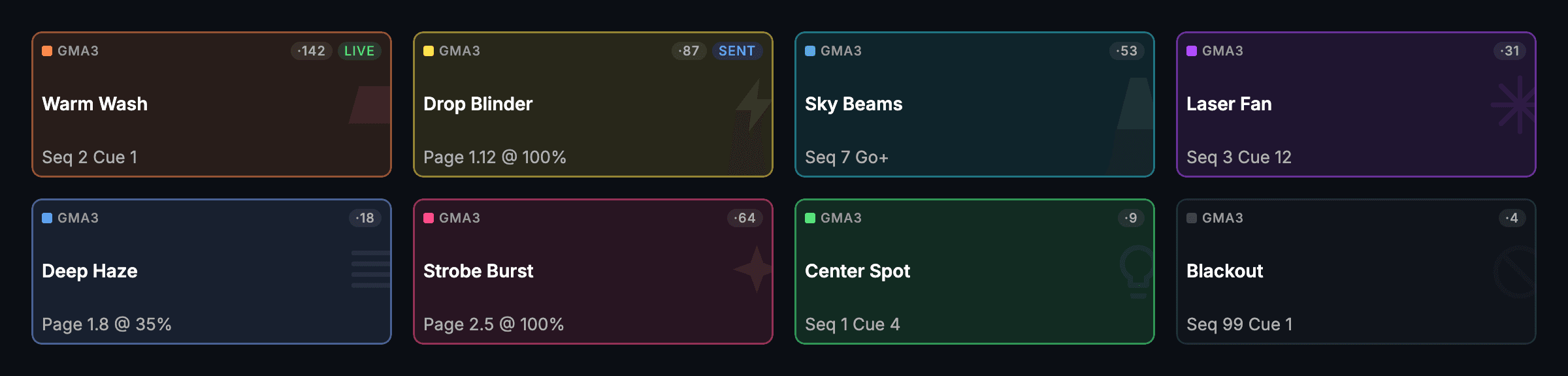
Eight grandMA3 Looks — Warm Wash live, Drop Blinder sent — each labelled with its console target and whether it is still holding.CueSync's Looks board for grandMA3: eight outlined Look tiles — Warm Wash live, Drop Blinder sent, Sky Beams, Laser Fan, Deep Haze, Strobe Burst, Center Spot and Blackout — each carrying its GMA3 target chip, the number of times it has fired, and the sequence, cue or page it sends.
CueSync/Palette
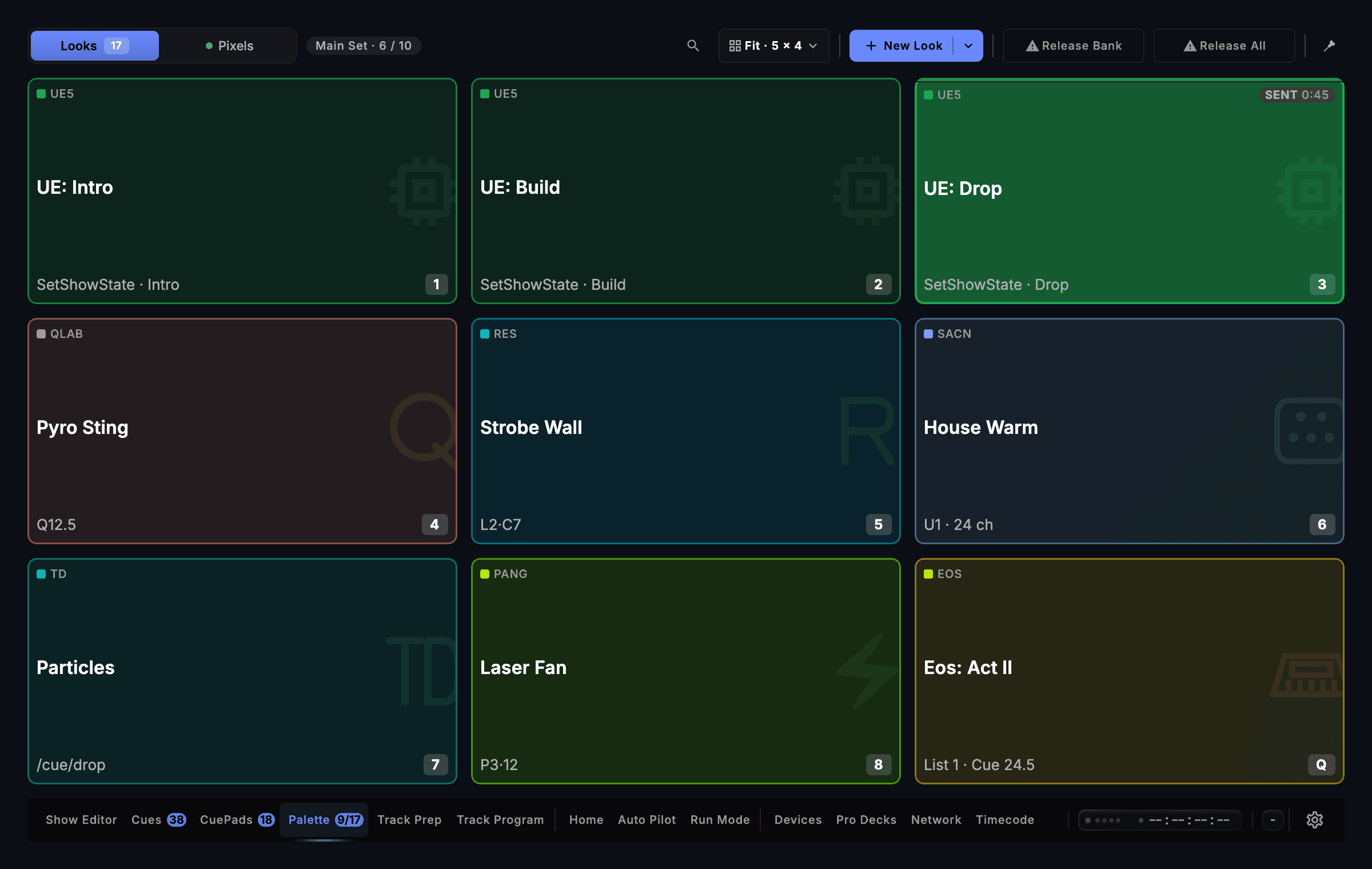
Nine tiles across seven engines and consoles, each naming its own target, with the live one saying how long it has been live.CueSync's Palette screen, the whole board: the Looks / Pixels switcher, the Main Set bank and the Fit 5 × 4 and New Look controls above a nine-tile board where each tile names its own target — three Unreal Engine show states, a QLab pyro cue, a Resolume clip, a 24-channel DMX scene, a TouchDesigner OSC address, a Pangolin laser look and an ETC Eos cue — with UE: Drop sent 45 seconds ago, and the navigation bar beneath.
Calling it
Two ways to run the same show. Theatre calls cues against timecode with a countdown; a DJ set lets the music call them and watches it happen.
CueSync/Run Mode
Locked to LTC at 25 fps, the next cue standing by with its countdown and the console page and cue it fires, GO and BLACKOUT one key away.CueSync's Run Mode running a theatre show: the header reading RUNNING in SHOW mode with timecode locked to LTC at 25 fps, an LX cue standing by with a FIRE button and eight more behind it, the RUN clock at 00:01:11:00 with Hold TC beside it, the NEXT card for cue '1.2 Act I build 2' routed to GMA3 page 1.1 cue 1.0 with a twelve-second countdown, per-department LX and VX rows each showing the last and the standby cue, the Running Order with nine cues to go and an ALL / LX / VX / SFX filter, a SHOW / DRY / REHEARSE+ switch, and GO and BLACKOUT.
CueSync/Performance
The master deck in sync at 128 BPM with DROP Blinder live and Groove Movers queued behind it — cue 3 of 5, beat indicator mid-bar.CueSync's live performance view: the master CDJ-3000 deck in sync at 128 BPM with the cue 'DROP Blinder' live, 'Groove Movers' queued next, and the beat indicator mid-bar — cue 3 of 5.
When something drops
The part of the product that matters at 22:40. A connection that stops answering is named, counted and retried in front of you — never quietly dropped.
CueSync/Outputs
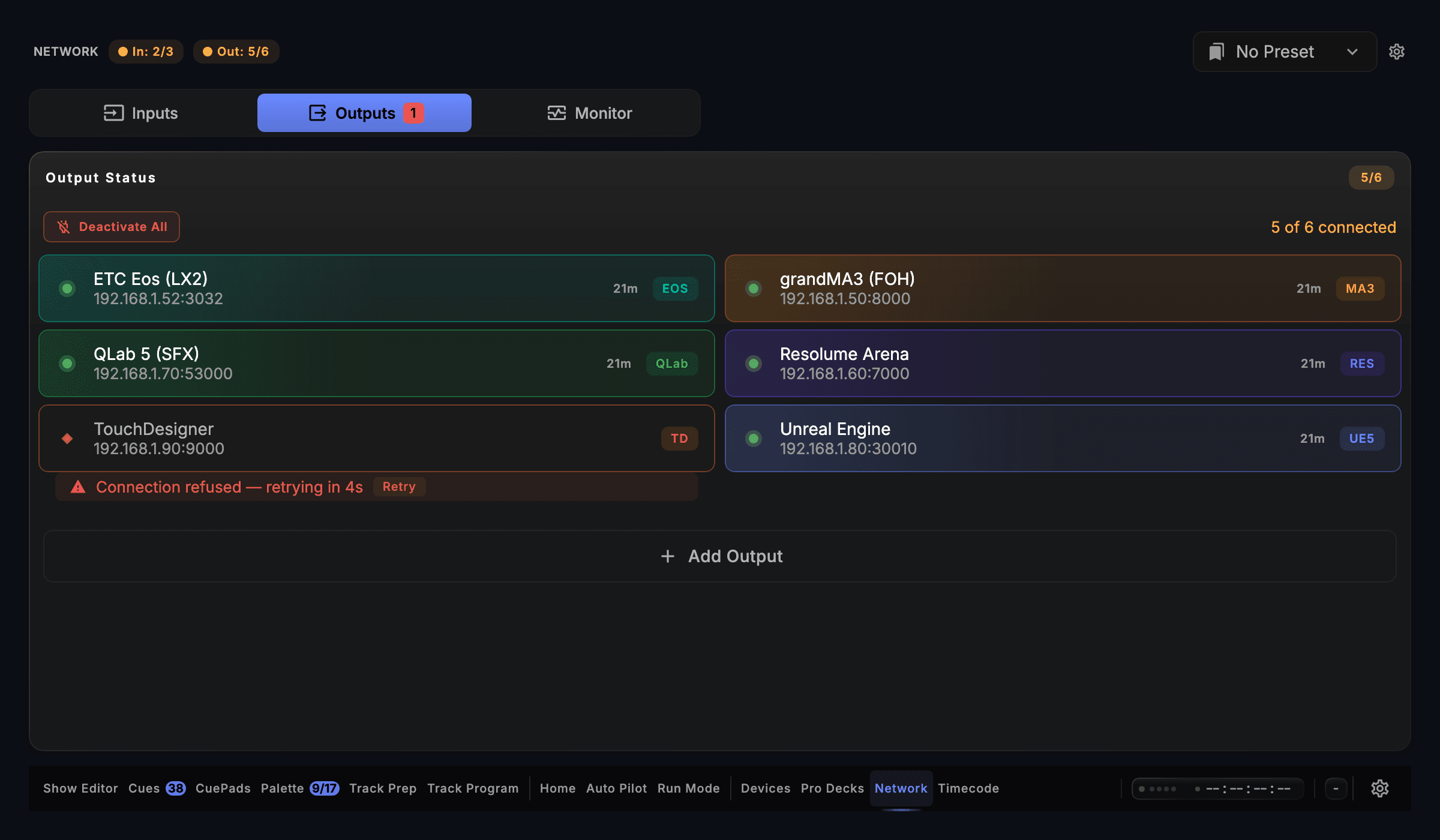
Six outputs on one rig: five connected twenty-one minutes deep, one refused — named, quoted, and counting down to its own retry.CueSync's Network screen on its Outputs tab: a header reading In 2/3 and Out 5/6 beside a preset picker, and the Output Status panel laying six outputs out in two columns — ETC Eos (LX2), grandMA3 (FOH), QLab 5 (SFX), Resolume Arena, TouchDesigner and Unreal Engine, each with its address — five connected for 21 minutes and TouchDesigner refused with 'Connection refused — retrying in 4s' and a Retry control, under the count '5 of 6 connected'.
CueSync/Recovery
A console stops answering: the alert names the device and offers a Reset, and four outputs keep firing.CueSync recovering from a dropped console: a critical alert naming TouchDesigner with a Reset control, the per-output health ladder showing grandMA3, Resolume Arena, QLab 5 and ETC Eos still live, and the Output Status panel underneath laying its outputs out in two columns, reporting four of five connected with the failed leg's error — connection refused, retrying in 4s — and a Retry button.
These are stills of the shipping app. The 3D Virtual Stage is a simulated rig that responds in real time, in your browser, with no download and no hardware.