Built for stage managers, LDs, and TDs
Call the show. Every department fires.
Run Mode calls your cue list on timecode or your GO and fires lighting, video and sound together. Sync to grandMA3 previews every command before it sends one, and when a note adds a cue, the cues already on the desk keep their numbers and their looks. Cue sheets leave as files that open without CueSync.
CueSync/Show Editor
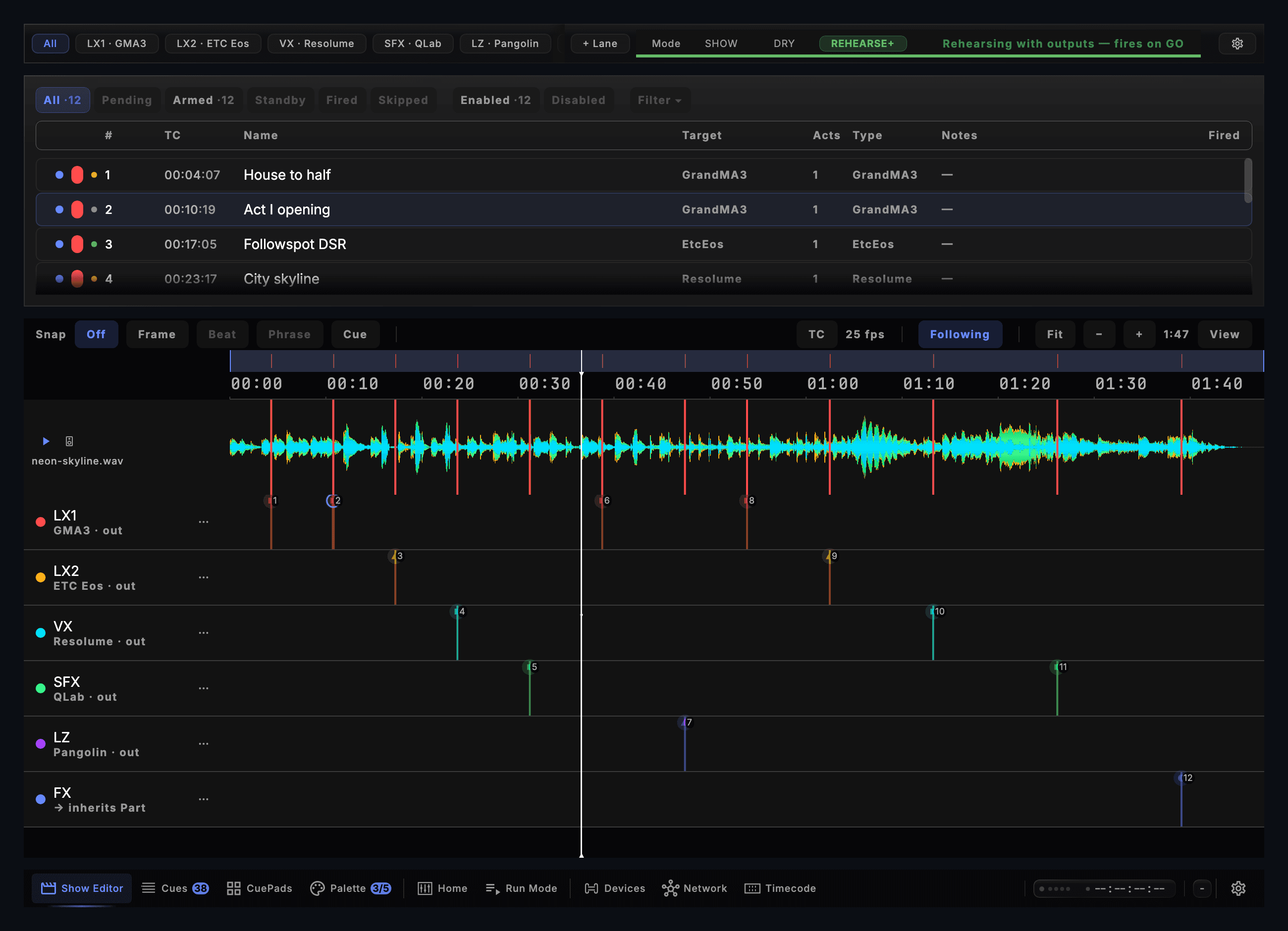
- Six lanes → grandMA3, ETC Eos, Resolume, QLab, Pangolin
- Twelve cues on the Drafted / Tested / Ready ladder
- SHOW · DRY · REHEARSE+ — rehearse with or without outputs, from the toolbar
For the TD
The questions the person who signs for the show asks first.
- The show is your file
- Cue sheets export as PDF, CSV, HTML and Markdown, and the cue list as USITT ASCII, an MA3 Timecode XML and REAPER markers. Every one of those files opens without CueSync.
- A backup Mac
- A single-user licence registers two Macs, a primary and a backup, and drives live output from one of them at a time.
- Preview before you send
- Sync to grandMA3 shows every command before it sends one, and it has been run on a physical grandMA3 console. Run the preview against your own desk before a live production.
The Theatre Edition workflow
Nine capabilities that turn manual cue programming into a once-and-done authoring pass. Every cue still calls when you tell it to — the difference is what stops being your job.
CueStack with unlimited cues
Author every cue your show needs — no per-list cap, no truncation at scale. Follow and Autocontinue chain cues the way a desk does, Goto cues jump or loop, group cues fire a set together, and Load cues arm the next one so the GO is instant.
A timeline built into the Show Editor
Place cues on a timecode-ruled time axis and let CueSync execute them frame-accurately. The Show Editor is the timeline — the master waveform over the ruler, colour-coded output lanes carrying their own cue markers — so you automate what's automatable and hand-call the rest without leaving the screen.
Frame-accurate SMPTE
Chase an incoming LTC, MTC, Art-Net or TCNet master, or be the clock: generate LTC, MTC, Art-Net timecode and TCNet. Lock every lighting, sound, and video cue to the same frame so a 200-cue show feels like one operator pressing one button.
Show Editor + Run Mode
Two distinct environments — design in the editor, execute in run mode. Rehearsal never leaks into showtime, and the same show file moves cleanly from dry to tech to dress.
Companion crew board
Scan a QR code and any iPad backstage becomes a live crew board: virtual cue lights, countdowns and STANDBY / GO calls for the stage manager and each department, served from the show machine over venue Wi-Fi with nothing to install. A monitor page puts connection health and timecode in front of FOH tech.
Two-way grandMA3 sync
Session Sync writes your cue list straight into a grandMA3 sequence — numbers, labels, fades and optional follow times. You preview every command before anything is sent, a re-push never re-stores a cue you did not change, and a read-only bridge plugin reads the desk back. The Timecode object that fires the cues can be sent the same way, one song or the whole setlist. No network to the desk? The same list goes on USB as an MA3 or MA2 macro or a Timecode XML. Run on a grandMA3 console.
Bring the cue list with you
Import markers from REAPER, Lightworks, Premiere Pro, DaVinci Resolve, Audacity, Pro Tools or a MIDI file, any CSV whose columns name a start time and a cue name, or a grandMA3 Timecode XML — or pull a sequence straight off the desk.
Paperwork for every department
Export cue sheets as PDF, HTML, CSV or Markdown — the operator's cue list, the stage manager's calling script, a running order, and lighting, sound and media sheets — or a USITT ASCII cue list. Every one of those files opens without CueSync.
Pre-show review
A per-track readiness review before the curtain — ready / tested / drafted counts across every cue list and a headline ready percentage. Unfinished cues surface before the house opens, not as silent runtime failures.
CueSync Theatre vs manual cue calling
What the software takes over, and what stays with the stage manager.
With CueSync Theatre
Manual cue calling
Cue programming
CueSync — Author once, evaluate live against the show clock
Without — Re-author or re-time after every script revision
Cue calling
CueSync — Show Editor auto-GO with operator override
Without — Every cue called by hand
Pickup & dress notes
CueSync — Edit cue in Show Editor, save, snapshot in history
Without — Re-write paper cue sheet, re-print, redistribute
Getting cues onto the desk
CueSync — Session Sync pushes the cue list into a grandMA3 sequence, previewed first, and reads it back; the Timecode object over the network, or a macro or Timecode XML for USB
Without — Type every cue number and label into the desk by hand
Timecode lock
CueSync — Frame-accurate MTC / LTC / ArtNet / TCNet
Without — External LTC generator + manual sync
Console replacement
CueSync — Sits alongside your existing console — no replacement
Without — Console operator still required for live overrides
First-night setup
CueSync — Build the venue profile once during load-in (auto-recognized on every return); the pre-show review surfaces unfinished cues before curtain
Without — Walk the rig, hand-check every output, hope nothing changed
Theatre operator questions
Does CueSync replace my lighting console or my stage manager?
No. CueSync sits alongside your existing console — grandMA2, grandMA3, ETC Eos, ChamSys MagicQ, Avolites — and reclaims the time your stage manager and lighting designer spend on manual cue programming, pickup notes, and frame-by-frame timecode lock. Your console operator still runs the show; CueSync just removes the boring half of their job.
Can CueSync put my cue list on the grandMA3?
Yes. Session Sync pushes a Part's cues into a grandMA3 sequence over the network — numbers, labels, fades and optional follow times — and shows every command before it sends. A re-push is a merge that never re-stores a cue you did not change, so the looks your LD programmed survive, and a read-only bridge plugin on the desk reads the sequence back. The Timecode object that fires the cues can be sent over the same connection. With no network, export the same list as an MA3 or MA2 macro or a Timecode XML and carry it on USB. Session Sync has been run on a grandMA3 console; every other desk is fired live from the cue list.
Will my touring show files move between venues?
Yes. Venue profiles capture each rig, and recognition doesn't depend on IP addresses, so DHCP changes between cities don't break it. When CueSync joins a new network it auto-recognizes the matching profile if you've been there before, and falls back to the manual setup wizard if you haven't. Show files reference profiles rather than hard-coded addresses, so the same cue list runs against whichever rig is wired up.
What if the timecode source drops mid-show?
Every protocol connection — including timecode — recovers automatically. If MTC drops, CueSync keeps trying, surfaces the disconnect on the Network screen and the Companion monitor, and resumes the moment the signal returns. Held cues don't strand fixtures: they return to the resting state automatically. See the reliability page for the full live-show reliability story.
Does CueSync emit MIDI Show Control?
Yes. MSC SysEx is one of CueSync's protocol outputs alongside MIDI, OSC, TCP, and UDP. The MSC layer routes by configurable device ID with identity filtering — misconfigured IDs become operator-visible warnings rather than silent drops at runtime.
Call the demo show before your next tech.
Theatre Edition is $32/mo or $299/yr, excluding tax. Refund window: 14 days on monthly subscriptions, 30 days on annual and lifetime. See the refund policy for details.
See also
CueSync for AuditoriumsCueSync for Event ProductionTimecode Calculator (free tool)Rig Check (free tool)ETC Eos IntegrationQLab IntegrationLooking at CuePoints?Looking at ShowKontrol?Looking at Manual Timecoding?Where Should Your Show's Timecode Come From?How to Send Timecode to grandMA3: LTC, MTC, Art-Net and TCNetAudio-Reactive Cues Over OSC: What QLab Can and Cannot DoHow to Trigger ETC Eos Cues from the MusicMIDI Show Control: Still the Most Reliable Cue TriggerHow to Trigger Lighting Cues Without a Click Track