Built for tech directors at multi-element programmes
Every programme. One show file. One volunteer running the booth.
CueSync drives your lighting console, your audio cue stack, and anything else that takes OSC or MIDI, presentation software included, from a single Show Editor file. Theatre Edition covers the scripted programme — welcome, spoken word, announcements — with CueStack, Run Mode, and a Companion monitor that keeps every connection visible so the volunteer in the booth sees issues before the audience does. A music segment on a cue list runs in Theatre too; choose Production when the songs themselves should drive the lights, with AutoPilot planning a look for each one from its structure.
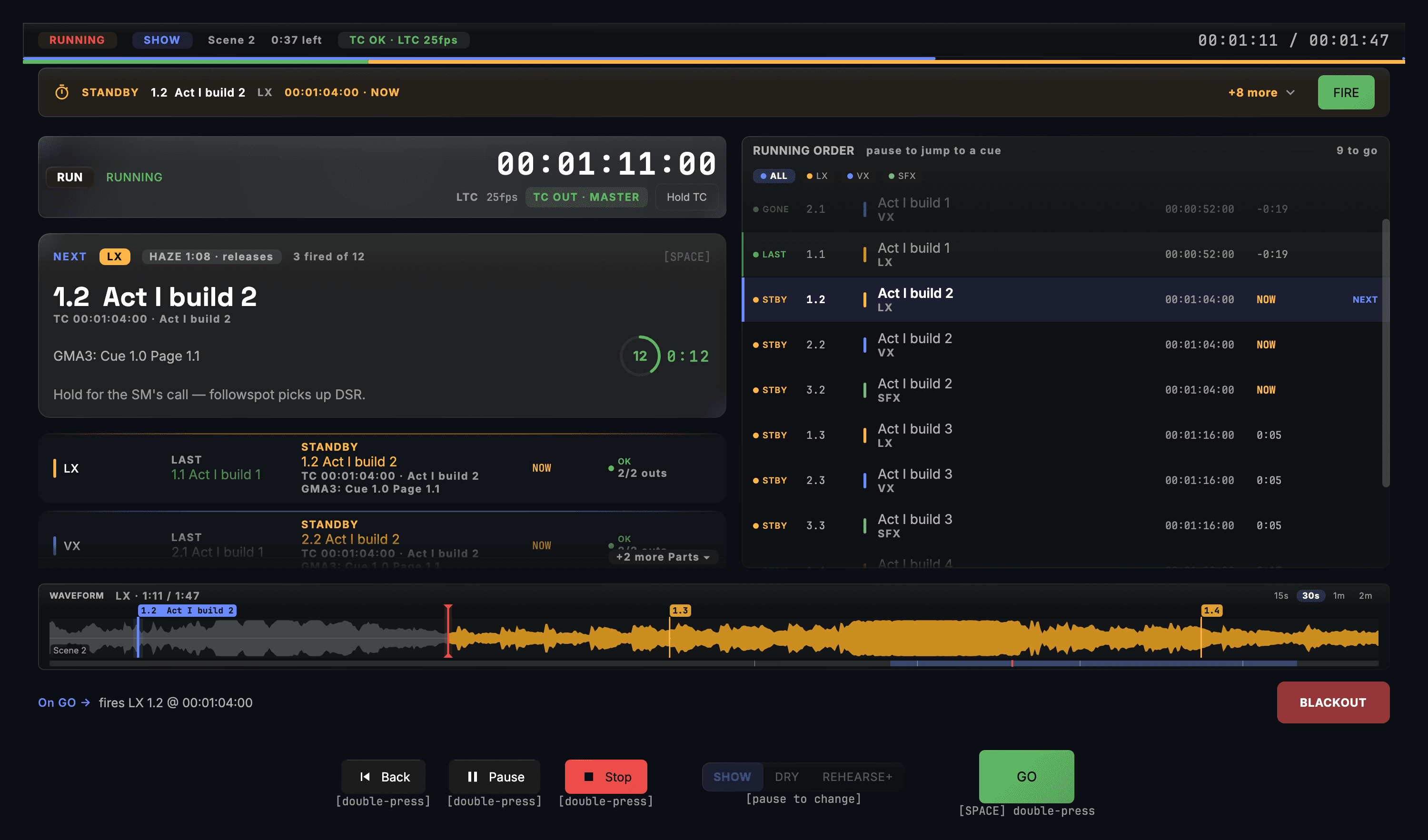
RUNNING
- Locked to LTC at 25 fps — 00:01:11:00
- Next cue routed to GMA3 Page 1.1 Cue 1.0
- LX · VX · SFX last and standby, nine cues to go
Six capabilities for the tech booth
Designed for the tech director who reuses a show file across every weekend and trains a rotating team to operate it.
One show file across every programme
Author your programme cues once; rerun against this week's running order, next week's, and the mid-week session. CueStack handles the scripted segments — welcome, spoken word, announcements — on Theatre Edition. AutoPilot, which plans a look for each song from its structure when the music segment plays from a deck or Local Audio, is in DJ and Production; with the scripted programme in the same show file, that is Production Edition.
Lyric + lighting + audio cues unified
Trigger your presentation software — anything that takes OSC or MIDI — from the same cue that dips house lights and recalls the grandMA3 look. One operator surface, every system, every programme.
Frame-accurate timecode for stream
Generate LTC, MTC, Art-Net timecode and TCNet from one clock. Lock the stream switcher, the recorded music, and the lighting timeline to one source so the online audience sees the same beat as the room.
One show file, every campus
Author the programme once and run it from the same show file at each campus. Each location runs CueSync on its own machine and keeps its own saved venue profile; a team licence seats up to three machines driving live output at once.
Volunteer-friendly pre-show review
A per-track readiness review before the doors open — ready / tested / drafted counts and a headline ready percentage at a glance, with live connection status on every output. Nothing buried in a log.
Run Mode separates rehearsal from showtime
The Theatre Edition Run Mode locks editing out during the show window. The running order runs from the same Show Editor file you rehearsed with the day before — no last-minute keystroke can break the live programme.
Which edition does your venue need?
It comes down to one question: do you want AutoPilot planning looks for the music segment, or only scripted cue playback?
Theatre Edition
Scripted cue playback: CueStack, the Show Editor timeline, frame-accurate timecode, Run Mode, the Companion crew board, and up to 25 venue profiles. The right fit if your running order is planned and your music segments run to a fixed arrangement.
Production Edition
Theatre's cue list and the music-following side, in one show file: AutoPilot planning a look for each song from its structure, the Pioneer decks over PRO DJ LINK or your own audio files, Predictive Preview for the lead operator, and unlimited venue profiles.
Both editions include every output protocol; Theatre keeps up to 25 venue profiles and Production keeps unlimited. Compare both editions side by side.
CueSync in the booth vs paper-cue-sheet handoffs
What the software takes over, and where a present operator still shapes the moment.
With CueSync Theatre
Multi-app paper handoff
Cue programming across programmes
CueSync — Once-and-done show file with weekly small edits
Without — Re-build cue sheets for every running order
Lyric / lighting / audio sync
CueSync — One cue fires the slide, the lighting and the audio together, on anything that takes OSC or MIDI
Without — Three volunteers triggering three systems by paper cue sheet
Volunteer training
CueSync — Run Mode shows the cue that just went and the next one; the Companion monitor shows every connection
Without — Volunteer learns the lighting board, the slide app, the audio console
Unscripted moments
CueSync — Manual override + CuePad for unscripted moments
Without — Volunteer reads the room and follows in real time
Mid-programme errors
CueSync — Auto-reconnect with visible alerts — a lost connection is shown in the app
Without — First sign of failure is the song stopping or the slide going blank
Live-stream + in-room parity
CueSync — Frame-accurate timecode locks both to the same source
Without — Stream operator and lighting volunteer follow different clocks
Tech-director questions
Does CueSync replace our presentation software?
No. CueSync triggers it. If your presentation app takes OSC or MIDI, CueSync sends its slide-advance, blackout or clear command from the same cue that dips house lights or recalls a grandMA3 look. Your presentation app stays exactly as it is — CueSync just stops making one operator chase three apps at once.
Which edition do we need — Theatre or Production?
It depends on whether you want AutoPilot for the music segment. If you only need scripted cue playback, Theatre Edition works — CueStack, the Show Editor's timecode timeline, frame-accurate timecode, Run Mode, and a Companion crew board with cue lights for every department. AutoPilot — the engine that plans a look for each song from its analysed structure, for music played from a deck or Local Audio — is not in Theatre; for that you need Production Edition, which puts an AutoPilot-led set and the timecoded cue list in one show file and adds Predictive Preview. Both editions include every output protocol; Theatre keeps up to 25 venue profiles and Production is unlimited. A band playing live is run from the cue stack or the Show Editor timeline in either edition.
We have a rotating volunteer tech team. Is this too complex for them?
The point of authoring once and running everywhere is exactly to lower the bar on show day. Rehearsal happens with the same tech director or paid staff who sets up the cue file; the volunteer on the day uses Run Mode to push GO, with cue lights and countdowns on a Companion iPad beside them. The pre-show review surfaces unfinished cues before the doors open, not mid-programme.
What if a connected computer goes down mid-programme?
Every protocol connection reconnects automatically, and a stuck link is flagged rather than left to hang. The disconnect is visible on the Network screen and the Companion monitor — your operator sees it before the room does. See the reliability page for the full live-show reliability story; the same patterns that protect a touring show protect a weekly programme.
Show day, made calmer.
Theatre Edition is $32/mo or $299/yr, excluding tax. Refund window: 14 days on monthly, 30 days on annual and lifetime. See the refund policy for details, or contact us for multi-campus pricing.
See also
CueSync for Theatre OperatorsTimecode Calculator (free tool)Rig Check (free tool)MIDI, OSC & Link IntegrationgrandMA3 IntegrationLooking at CuePoints?Looking at ShowKontrol?Looking at Manual Timecoding?Audio-Reactive Cues Over OSC: What QLab Can and Cannot DoMIDI Show Control: Still the Most Reliable Cue TriggerHow to Trigger Lighting Cues Without a Click TrackMusic-Triggered Playbacks on ChamSys MagicQ