Built for club residents & touring DJs
Prep once in rekordbox. The lights follow it.
CueSync joins your PRO DJ LINK network as another player. The hot cues, memory cues and loops you set in rekordbox come across with the track, AutoPilot plans each track's moments before it plays, and a hot-cue press on the CDJ can fire the blinder. No second operator in the booth.
CueSync/Deck Strip
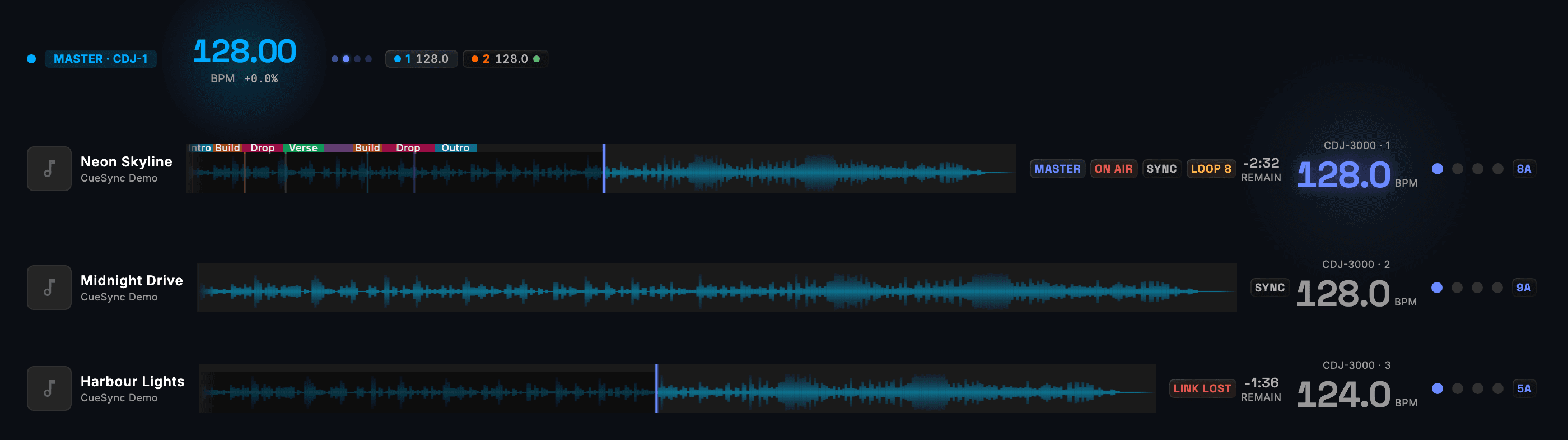
- Deck 1 master, on air, in an 8-beat loop, 2:32 remaining
- Deck 2 cued on its own track and already synced
- Deck 3 dropped off the link — and says LINK LOST, not a stale BPM
Swap the stick. Keep the prep.
CueSync reads the hot cues, memory cues and loops you already set in rekordbox off the USB in the player, so the prep you did stays yours. Play the same track from a different stick and CueSync offers the cues you prepared, matched by the track's title, artist, length, waveform and beat grid rather than the file name. Press Load and they are back.
Load the track from each stick once so CueSync learns the match. A re-tagged or re-analysed copy may not match, so check its prep before the set. DJ and Production editions.
Six capabilities that read your set
Designed for the DJ who runs the show solo or with a single ops person — automation that follows your music, not a pre-programmed timeline that breaks the moment you mix differently.
Pioneer PRO DJ LINK Built In
CueSync joins your PRO DJ LINK network as another player, so the beat, the tempo and the track on each deck come straight from the decks. No microphone, and no guessing the beat from the audio.
Phrase-aware automation
Reads the phrase map rekordbox wrote — Intro, Verse, Bridge, Chorus and Outro, or Intro, Up, Down, Chorus and Outro on high-energy tracks — and fires cues when the phrase turns over, not just every fourth beat.
AutoPilot plans the show from your track
When you load a track, AutoPilot plans the automation from rekordbox analysis. AutoPilot fires them hands-off during the show; the planned moments are visible on the Auto Pilot screen, and you can pause or override at any time.
CuePad for manual overrides
Tap-to-fire cue grid for the moments you want hand control — first track of the night, peak-hour moment, last song. Manual overrides layer on top of AutoPilot, never against it.
Hot cue triggers
CDJ hot cue A through H button presses fire CueSync cues. The same button that loops your favorite section also drops the laser ceiling.
Venue profiles auto-recognize the rig
Up to 3 venue profiles on DJ Edition. CueSync recognizes each rig from the outputs it finds (not by IP address, so DHCP changes don't defeat recognition) and auto-suggests the matching profile when you load in.
CueSync vs hiring a lighting designer
What the software takes over, and where the lighting designer stays your creative partner.
With CueSync DJ Edition
With a residency LD
Cue calling during a set
CueSync — AutoPilot fires beat / phrase / energy cues automatically
Without — LD watches the deck and presses GO manually
Track preparation
CueSync — Reads rekordbox phrase analysis + hot cues at load time
Without — LD memorizes set list and learns the tracks in advance
Set list changes mid-show
CueSync — AutoPilot plans the new track when it loads on the deck — no warning needed
Without — LD reads the deck label and adjusts on the fly
Creative direction & taste
CueSync — Operator-reviewed cues; CueSync follows your design choices
Without — LD's eye and taste — the actual creative work
Setting up a new room
CueSync — Load the venue profile — outputs, device roles and room limits come with it
Without — Re-patch and re-program the looks for each room
Club DJ questions
Will CueSync replace my lighting designer?
On a residency where you'd otherwise be calling cues yourself — or paying someone to push the same dozen Looks every weekend — yes, that's the whole point. On a marquee festival show where your LD's creative eye is part of the performance, no: CueSync is a tool that follows the design they author, not a replacement for the design itself. Most DJs need both modes at different times.
What do I need on the rig for this to work?
A Pioneer PRO DJ LINK network (a CDJ-3000, the deck CueSync has been run with, or a CDJ-2000NXS2 or XDJ-XZ, wired to a DJM mixer), plus the lighting console / fixture rig you already have. CueSync joins LINK as a virtual deck — your CDJs don't see a difference — and outputs to grandMA2/3, Avolites Titan, ETC Eos, ChamSys MagicQ, Resolume, MIDI, or OSC directly, plus Art-Net/sACN DMX-over-IP. No middleware boxes. No CDJs? Your own files in Local Audio, an Ableton Link session or a VirtualDJ beat over OS2L (Serato and rekordbox through an OS2L bridge) drive the same cues. A Local Audio queue runs as a set, with a Next Up card, Prepare set, and a Rehearse set that plays it through AutoPilot against your rig while sending nothing.
What happens when I bring my own laptop to a new venue?
Open the laptop on the venue's network. CueSync's venue recognition runs in the background — if you've been there before, it suggests the matching profile as soon as the rig is on the network. If you haven't, the setup wizard walks you through discovering the rig's outputs (LINK + GrandMA + whatever else) and saves the profile for next time. DJ Edition keeps up to 3 profiles; the Production Edition has unlimited.
Does CueSync work with rekordbox tracks that don't have hot cues set?
Yes — it falls back to PRO DJ LINK beat phase + BPM, which works on any track. Hot cues and the rekordbox phrase map add the finer triggers: a cue on a hot-cue press, or on the phrase turning over. The /tools/cue-finder utility can scan your rekordbox XML and find tracks with missing analysis so you can re-prep them in batches.
Free to download. Free to explore.
DJ Edition is $30/mo or $279/yr, excluding tax. You can run the demo show and tour the app in read-only mode before you subscribe; refund window of 14 days on monthly, 30 days on annual and lifetime. See the refund policy for details.
See also
CueSync for Touring DJsCue Finder (free tool)Rig Check (free tool)Pioneer DJ Link IntegrationgrandMA3 IntegrationLooking at SoundSwitch?Looking at Lightkey?Looking at MaestroDMX?Looking at SoundSwitch Alternatives? What CueSync DoesHow to Automate DJ Lighting with grandMA3 (2026 Guide)The Complete Guide to Stage Automation for DJs in 2026