Built for touring DJs, festival circuits, and brand tours
One show file. Every city. Every rig.
Touring is a series of unfamiliar networks, unfamiliar rigs, and unfamiliar LDs. CueSync recognizes each venue by the rig it finds and auto-suggests the matching profile when you land, and your prep is offered back when you play from a different stick. Author your AutoPilot show once; route it through whichever console the venue gives you.
CueSync/Pro Decks
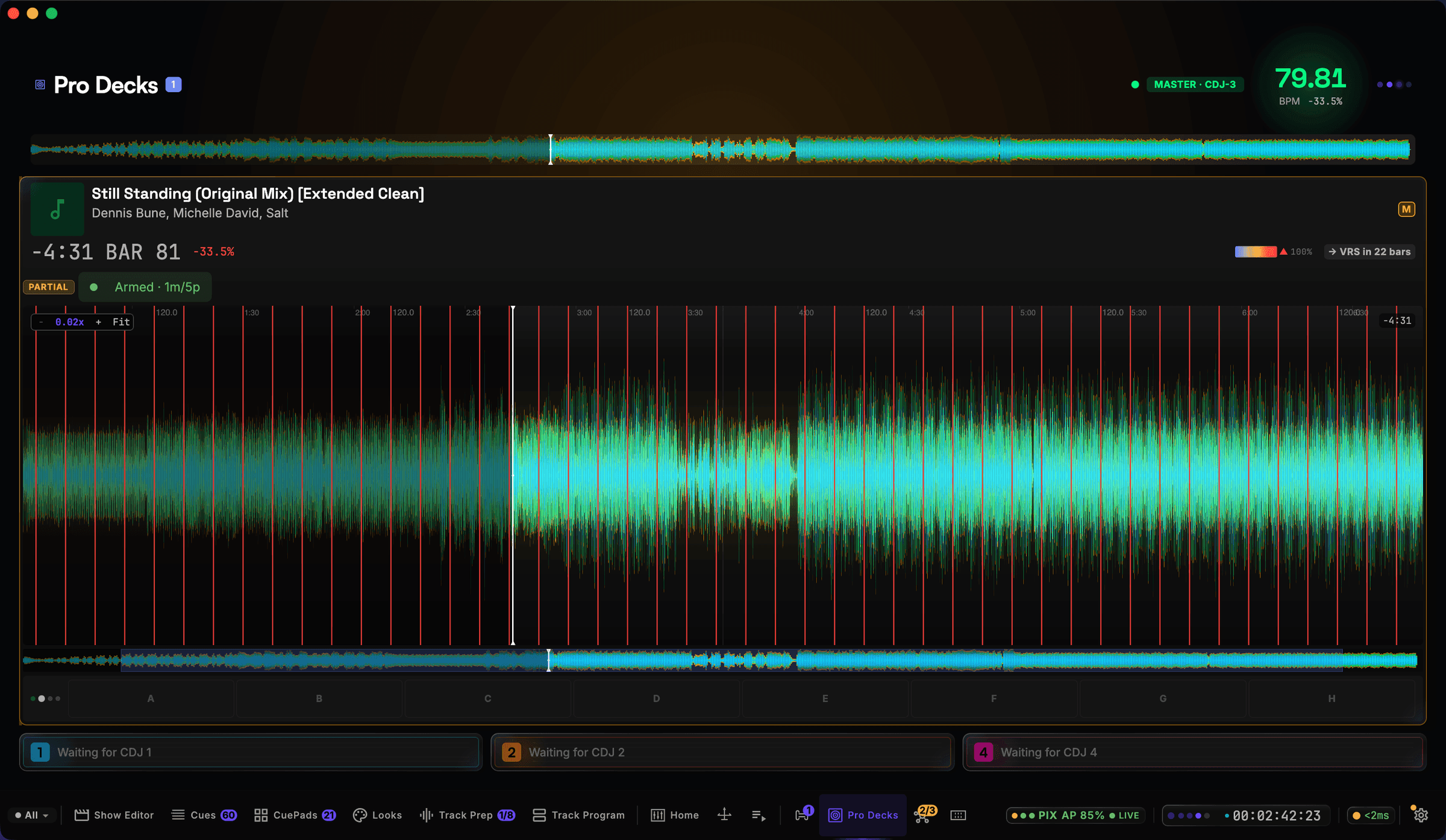
- Master CDJ-3000 on air — 79.8 BPM at −33.5% pitch
- Three-band waveform streamed from the player, at bar 81
- Hot cues A–H on the lane, next phrase called 22 bars out
Captured live from a connected Pioneer CDJ-3000 — not a mock-up or a render.
Six capabilities the road actually rewards
Built for the operator who doesn't know what network they'll find when the bus rolls in.
Venue auto-recognition
CueSync recognizes a venue from the rig it finds, not from IP addresses, so DHCP changes between cities don't defeat recognition. Land in a venue you've played before; the matching profile auto-suggests as soon as the rig is on the network.
Portable show files
Author once on your laptop, run anywhere. Your Track Programs, CuePad bank, hot-cue triggers, and energy/key analysis ship as a single show file. Drop into the venue's PRO DJ LINK network and the show loads against whatever rig is wired up.
Built for venue networks you don't control
DHCP, broadcast storms, mid-show DJM reboots — the touring network is hostile by default. Every protocol connection reconnects automatically, and one bad link doesn't freeze the rest of the rig.
Connection problems stay visible on a road show
When a connection is lost, CueSync shows it in the app — failures it can detect raise operator-visible notifications, not just background log lines. Outputs sent over UDP cannot confirm delivery, so soundcheck is still where you confirm a cue reaches the rig.
Up to 3 venue profiles on DJ Edition
Three profiles cover most touring DJs' rotation. If you regularly play more than three rigs and need to keep all of them dialed in, Production Edition lifts the cap to unlimited profiles. Switch tiers anytime without losing data.
Pioneer PRO DJ LINK built in, everywhere
Every CDJ-3000, CDJ-2000NXS2, XDJ-XZ, DJM-A9, and DJM-V10 in your touring rotation joins the same virtual-deck LINK negotiation. No middleware boxes to carry, no Pro DJ Link Bridge required on a flat wired rig.
CueSync on tour vs re-authoring per city
What the software takes over from city to city, and what stays with you in the booth.
With CueSync on tour
Per-city manual prep
Show file portability
CueSync — One show file, every venue — references profiles by ID
Without — Re-author or re-map per venue's specific rig
Load-in time
CueSync — Auto-recognized profile in seconds + pre-show readiness review
Without — Walk the rig, hand-check every output before doors
Network instability mid-show
CueSync — Automatic connection recovery + visible status
Without — Operator scrambles to spot the dropped link
Advance with new venues
CueSync — First visit sets up the profile; second visit auto-loads
Without — Every visit is a first visit
House-LD coexistence
CueSync — Sits alongside the venue's LD and console — doesn't fight
Without — Same — house LD is part of the deal
Marquee creative show design
CueSync — Executes your design choices in cue authoring
Without — Your LD / production designer is the creative hand
Touring DJ questions
What if the venue has a different lighting console at every stop?
That's the touring norm — and exactly what CueSync's integration breadth is built for. The same show file outputs to grandMA2, grandMA3, ChamSys MagicQ, Avolites Titan, ETC Eos. CueSync translates your cues into the right protocol at fire time; you don't re-author per console, you re-route per venue profile.
Can the house LD see what I'm sending and override?
Yes — and it's encouraged. CueSync is an automation layer that runs alongside the house operator, not a console replacement. The house LD watches the Performance screen's Mission Control HUD or their own console to see what's firing and overrides manually when they want a different look. The relationship is collaborative, not adversarial — the LD focuses on the moments that matter, CueSync handles the routine cues.
What about jurisdictions where the venue's network is wireless / routed?
PRO DJ LINK is designed for a flat wired show network — that's how the Pioneer protocol works. On a wireless / routed venue network, Pioneer's own Pro DJ Link Bridge is required (CueSync doesn't replace it). On a typical festival rig with a wired DJM at the front, CueSync joins directly as a virtual deck — no bridge needed.
How do I switch between three venue profiles on DJ Edition?
Venue recognition picks the matching profile automatically on load-in. Manual switch is one click in the venue panel. If you regularly rotate more than three rigs, the Production Edition lifts the cap to unlimited — and the upgrade keeps all your existing profiles + show files intact.
Same show, every city.
DJ Edition is $30/mo or $279/yr, excluding tax. Free to download and explore in read-only mode; refund window of 14 days on monthly, 30 days on annual and lifetime. See the refund policy for details.