Integration · Playback · Pioneer PRO DJ LINK
Auto-Sync Your Lights to Pioneer DJ CDJs
CueSync extends the SYNC concept beyond decks. Your CDJs already auto-sync tracks to each other — CueSync auto-syncs your lighting, visuals, and show systems to your CDJs. Reads PRO DJ LINK directly for tight beat-locked automation.
Pioneer PRO DJ LINK spec sheet
| Speaks | PRO DJ LINK · OSC · MIDI · Art-Net · sACN |
|---|---|
| Built for | CDJ-3000 · CDJ-2000NXS2 · CDJ-2000 Nexus · XDJ-XZ · XDJ-RX3 · DJM-A9 · DJM-V10 · DJM-900NXS2 · DJM-750MK2 · rekordbox 6/7 (when exporting to USB)Built for the players and mixers that speak PRO DJ LINK. |
| Editions and plans | In DJProductionDecks |
| Manual | /docs/connect/pro-deck |
Pioneer PRO DJ LINK is in DJ, Production and the Decks plan. A capability marked with an edition needs that edition.
What CueSync sends to Pioneer PRO DJ LINK
| Direct PRO DJ LINK | Reads CDJ and DJM beat phase, BPM, master tempo, and track metadata directly over Ethernet — no audio analysis latency, no microphone needed. |
|---|---|
| Beat Phase Precision | Locks to the CDJ's own beat grid for phase-accurate cue triggering. |
| Track Metadata | Reads track title, artist, key, hot cues, and waveform data from rekordbox-prepared tracks — different looks per track, automatically. |
| Dropout Handling | If PRO DJ LINK drops (a CDJ rebooting, a network glitch), CueSync warns you on screen and reconnects on its own as soon as the network recovers. |
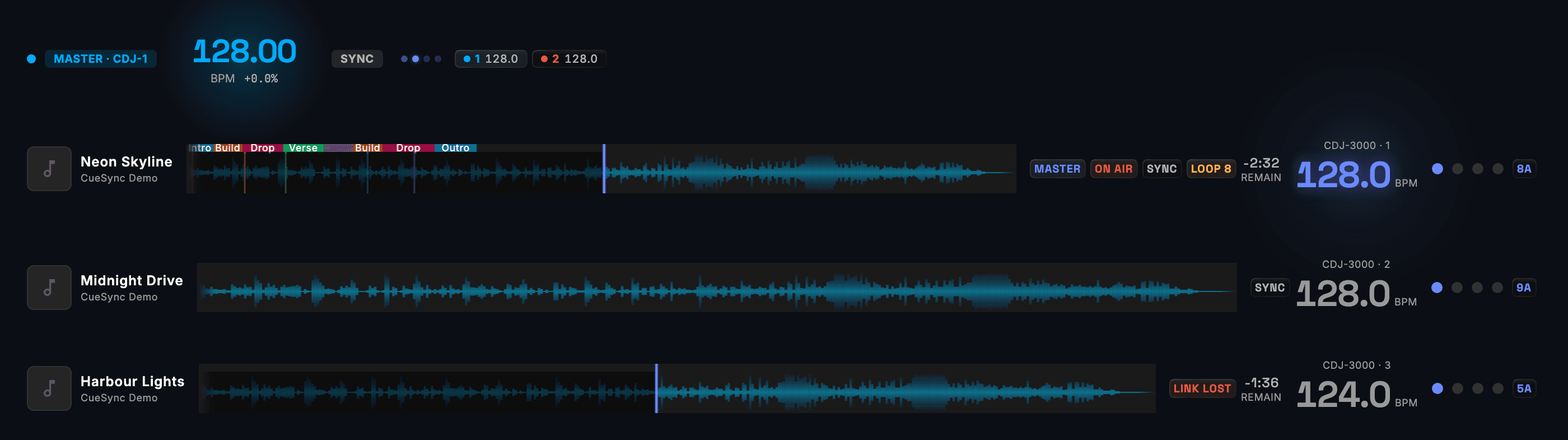
| Multi-Deck Awareness | Sees all decks simultaneously — knows which is master, which is cueing, and handles transitions automatically. AutoPilot follows your set, not the loudest deck. |
| AutoPilot (DJ · Production) | Hands-free lighting and visual automation that follows energy, builds and drops from PRO DJ LINK and the track's phrases. |
Set it up
Pioneer PRO DJ LINK with CueSync, in 5 steps.
- 1Connect CueSync and your CDJs/DJM to the same network — Ethernet via the DJM's PRO DJ LINK port is recommended; Wi-Fi works for testing only.
- 2Launch CueSync. PRO DJ LINK devices auto-discover within seconds — no manual IP configuration, no PRO DJ LINK Bridge needed for lighting/visual output.
- 3Select the master deck source in CueSync's PRO DJ LINK panel (or leave on auto-follow to track the player flagged MASTER on the rig).
- 4Map beat, phrase, and track-metadata triggers to lighting cues, OSC commands, or DMX universes in a cue's actions.
- 5Load a track on a CDJ and watch its beat, phrase and position appear in CueSync's deck strip — that works before you subscribe. With a subscription, the cues you build fire to your rig.
Integration details
Specifics that hold up in production
What CueSync's Pioneer PRO DJ LINK integration does and how it behaves — the things you can check before the show.
- Beat-aligned timing
- CueSync times cues to the beat phase of the music and is designed for live production. What you see and hear end to end also depends on your network, console or media server, and fixtures, so confirm the whole chain on your own rig before a show.
- Every output protocol, one application
- CueSync ships 17 output protocols from a single desktop application: grandMA2 (Telnet), grandMA3 (TCP OSC and UDP OSC), Avolites Titan, ETC Eos, ChamSys MagicQ, Art-Net, sACN, Resolume, disguise (d3), VIOSO Player/Show, AV Stumpfl Pixera, TouchDesigner, Unreal Engine 5, QLab 5, MIDI Show Control, Pangolin BEYOND, and Custom OSC. Every CueSync edition includes every protocol.
- Two parallel Pioneer-data paths
- CueSync ingests Pioneer DJ data via two parallel paths. The network path is PRO DJ LINK: CueSync joins the Pioneer network and receives beat, tempo and player status from every connected player. The USB path is direct rekordbox analysis: phrase structure (Intro, Verse, Chorus, Drop, Breakdown, Fill, Outro), hot cues A through H with colours, the beat grid for downbeat alignment, energy curves, loops, and memory cues.
- Built for live-show reliability
- Every output connection recovers automatically, connection state is visible to the operator, and every failure CueSync can detect is reported during a show. A held cue is released automatically if the window loses focus mid-flash.
Pioneer PRO DJ LINK questions
Does CueSync auto-sync to Pioneer DJ CDJs the same way two CDJs sync to each other?
Conceptually yes, mechanically different. The SYNC button on a CDJ aligns one deck's tempo and beat phase to another deck. CueSync reads that same beat phase data over PRO DJ LINK and uses it to fire lighting and visual cues in time with the beat. Your CDJs handle deck-to-deck sync; CueSync handles deck-to-show-system sync.
Do I need rekordbox-prepared tracks for CueSync to work?
No. Beat phase and BPM come over PRO DJ LINK however the track was prepared; rekordbox analysis adds the title, key, hot cues and waveform for richer cueing.
What's the latency from a CDJ beat to a lighting trigger?
CueSync reads beat phase straight from the deck over wired Ethernet, so triggers follow the beat with no audio-analysis delay. Your console, network and fixtures add their own response time, and a wired show network keeps the whole chain tight.
Do I need Pioneer DJ's PRO DJ LINK Bridge?
No. CueSync joins the PRO DJ LINK network directly over standard Ethernet. PRO DJ LINK Bridge is required only when you want PRO DJ LINK over a wireless or routed network; on a flat wired rig, CueSync connects directly.
Which Pioneer DJ players are supported?
The CDJ-3000, CDJ-2000NXS2, CDJ-2000 Nexus, XDJ-XZ and XDJ-RX3 players and the DJM-A9, DJM-V10, DJM-900NXS2 and DJM-750MK2 mixers, all over the same PRO DJ LINK network. On an older CDJ-2000 (non-Nexus) the protocol carries BPM but not hot-cue metadata.
Does CueSync replace the DJ?
No. On setups without a lighting designer — DJs, mobile rigs, smaller venues — CueSync runs the lighting from the music. On touring shows with a dedicated LD, it runs alongside as the automation layer for the cues the LD doesn't want to hand-trigger.
What happens if the PRO DJ LINK connection drops mid-set?
CueSync detects the drop, warns the operator on screen, and reconnects to PRO DJ LINK automatically as soon as the network recovers. You are never left guessing whether the link is up.
Will CueSync run on Windows or Linux?
No. CueSync runs on macOS 12 or later on Apple Silicon; there is no Windows or Linux build.
Different question? Ask us directly.
Last reviewed .
Guides
Guides for this rig
Step-by-step guides for a show that runs with Pioneer PRO DJ LINK.
Run your next show on cue.
Download CueSync free and run the built-in demo show — press Space and watch each cue fire on screen with nothing sent to real equipment, no hardware required. Subscribe when you're ready to drive a real rig.
CueSync is independent software developed by an independent team. Pioneer DJ®, CDJ®, DJM®, XDJ®, rekordbox®, and PRO DJ LINK™ are trademarks of AlphaTheta Corporation. CueSync is not affiliated with, endorsed by, or sponsored by AlphaTheta. Compatibility claims describe interoperability via the PRO DJ LINK network protocol, as documented by independent community researchers.