Integration · Playback · REAPER
REAPER markers and your cue stack, written once.
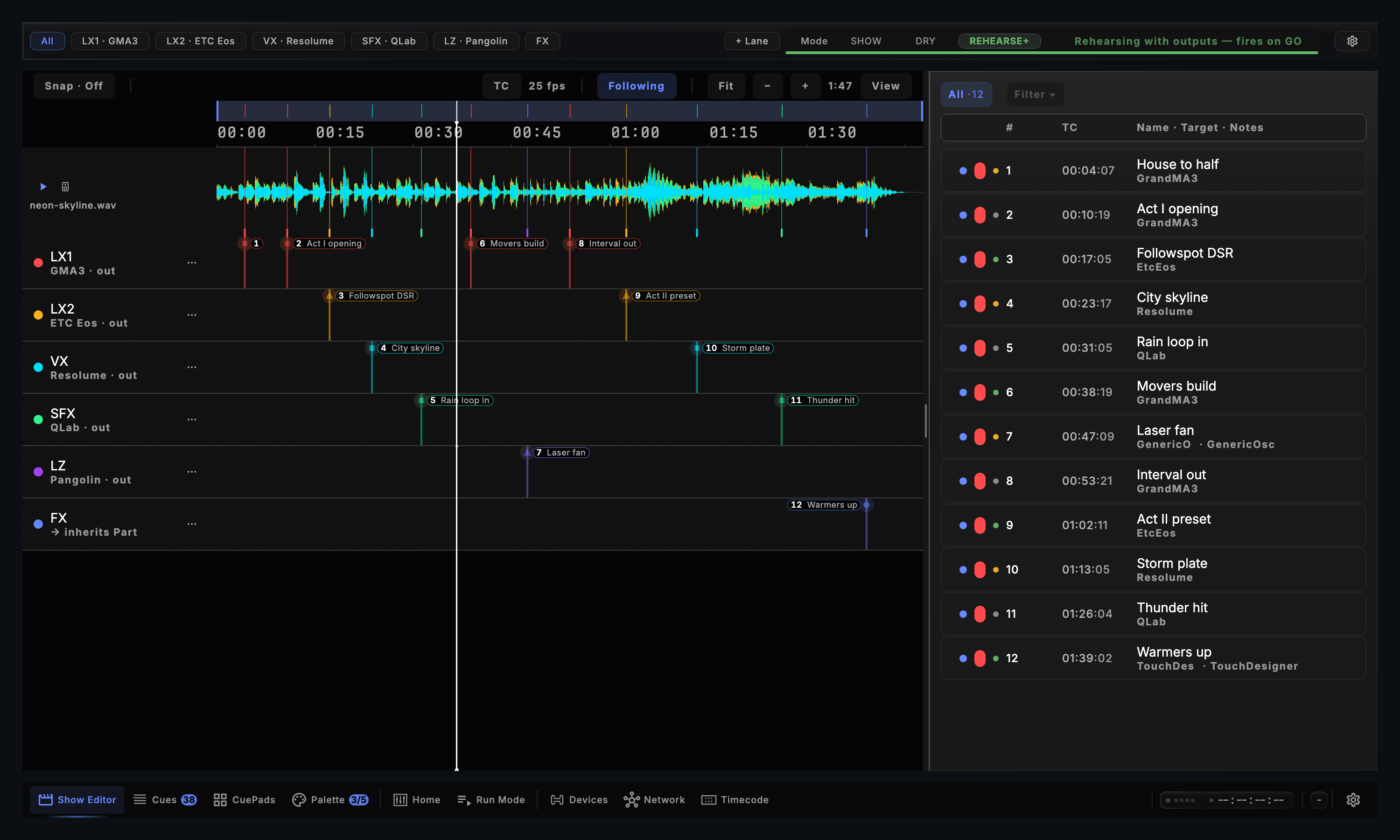
Import REAPER's Region/Marker Manager CSV straight into CueSync's Show Editor with cue numbers, regions, colours and sequence splits preserved — or export any Part back to REAPER as CueSync Markers.csv. Available in Theatre, Production and the Show Editor plan.
REAPER spec sheet
| Speaks | REAPER Marker CSV · SMPTE Timecode (LTC / MTC) |
|---|---|
| Built for | REAPER Region/Marker Manager CSV · CueSync Markers.csv (per-Part export) · MArkers / console bracket notation · LTC & MTC timecode stems from REAPERExchanges marker and region CSV files in both directions in Theatre and Production, while REAPER timecode stems lock CueSync over LTC or MTC. |
| Editions | In TheatreProduction |
| Manual | /docs/connect/reaper |
REAPER is in Theatre and Production. A capability marked with an edition needs that edition.
What CueSync sends to REAPER
| Import Markers & Regions as Cues | Import Reaper Markers… turns point markers into numbered cues and REAPER regions into cues with start-to-end spans and matched cue colours. |
|---|---|
| Export CueSync Markers.csv | Export Reaper Markers… writes one marker or region per enabled cue in a Part, preserving cue numbers, fades and release flags in bracket notation. |
| Console Bracket Vocabulary | CueSync parses console tokens embedded in REAPER marker names: (100) sets the cue number, [Flash] or [Temp] releases a region at its end, and <4/3>, {Call Macro 1} and ^Front Truss^ are recorded safely in cue notes. |
| Split One CSV into Departments | When a REAPER file carries multiple ^Sequence^ tags or marker colours, CueSync offers to split them into separate department tracks such as LX and Video. |
| Frame-Rate & Venue-Origin Aware | Reads seconds, MM:SS.mmm, H:MM:SS.mmm and frame timecode at your project rate (including 23.976 and 29.97 drop-frame), subtracting the project's venue origin automatically. |
| No Silent Guesses on Bad Rows | Unreadable rows, impossible frame numbers, nonexistent drop-frame labels (;00/;01) and bars-and-beats rulers (5.1.00) are refused by name rather than placed at 0:00. |
Set it up
REAPER with CueSync, in 5 steps.
- 1In REAPER, set the timeline ruler to Seconds, Minutes:Seconds, or Hours:Minutes:Seconds:Frames (never Measures.Beats), open View → Region/Marker Manager, right-click and export markers/regions to CSV.
- 2In CueSync, check Settings → Timecode matches the session's frame rate and venue origin if your CSV uses a frames ruler.
- 3Choose File → Sync, Import & Export → Import Reaper Markers… and pick the CSV. Choose whether to split by colour or ^Sequence^ if prompted, then bind console or media actions in the Show Editor.
- 4To send a CueSync Part back to audio, choose File → Sync, Import & Export → Export Reaper Markers… to write CueSync Markers.csv, then import it in REAPER's Region/Marker Manager.
- 5For lighting desks that read REAPER-format timecode CSVs directly, use Export Desk Timecode CSV (MagicQ, Hog 4, Titan)… so only clock-fired cues are written in H:MM:SS:FF.
Integration details
Specifics that hold up in production
What CueSync's REAPER integration does and how it behaves — the things you can check before the show.
- Lossless round-trip marker syntax
- Because a REAPER marker stores only a timestamp, an optional end time, a name and a colour, CueSync encodes cue numbers, fades and region-end releases in standard bracket syntax on export and parses them back into structured Show Editor fields on import.
- Built for live-show reliability
- Every output connection recovers automatically, connection state is visible to the operator, and every failure CueSync can detect is reported during a show. A held cue is released automatically if the window loses focus mid-flash.
REAPER questions
What does CueSync do with bracket tags like Chorus (100) <4/3> [Flash] in REAPER marker names?
CueSync parses exact console tokens rather than leaving them in the cue label: (100) becomes cue number 100, [Flash] or [Temp] on a region sets the span to release at its end, and <4/3> fades, {Call Macro 1} commands and ^Front Truss^ sequence names are parked safely in the cue's notes without inventing unauthored actions.
Why did CueSync refuse a REAPER CSV exported in Bars and Beats?
A musical position such as 5.1.00 has no fixed time without REAPER's tempo map. Rather than guessing and placing cues at the wrong timecode, CueSync refuses bars-and-beats rows by name. Switch REAPER's ruler to a time or H:MM:SS:FF format and export again.
How does CueSync handle a REAPER session that starts at 01:00:00:00?
A frames-ruler label is treated as a reading of the house clock, so CueSync subtracts your project's venue origin (Timecode view) on import. With venue origin set to 01:00:00:00, a marker at 01:00:10:00 lands ten seconds into the Part; if venue origin is still 00:00:00:00, the import confirmation points out the one-hour offset.
Should I hand CueSync Markers.csv straight to ChamSys MagicQ, Hog 4 or Avolites Titan?
Use File → Sync, Import & Export → Export Desk Timecode CSV (MagicQ, Hog 4, Titan)… instead. CueSync Markers.csv includes manual GO and standby cues for the audio team, whereas the desk export writes H:MM:SS:FF on the house clock for clock-driven cues only.
Which CueSync editions include REAPER marker import and export?
Theatre and Production (and the Show Editor plan). Importing markers works in read-only mode so you can inspect a session's cue structure before subscribing; exporting CueSync Markers.csv requires an active licence.
Different question? Ask us directly.
Last reviewed .
Guides
Guides for this rig
Step-by-step guides for a show that runs with REAPER.
Run your next show on cue.
Download CueSync free and run the built-in demo show — press Space and watch each cue fire on screen with nothing sent to real equipment, no hardware required. Subscribe when you're ready to drive a real rig.
REAPER is a trademark of Cockos Incorporated. Other console names on this page are trademarks of their respective owners. CueSync is an independent product and is not affiliated with or endorsed by Cockos or any of them.