Integration · Show control & timecode · Timecode
One show clock, on every wire.
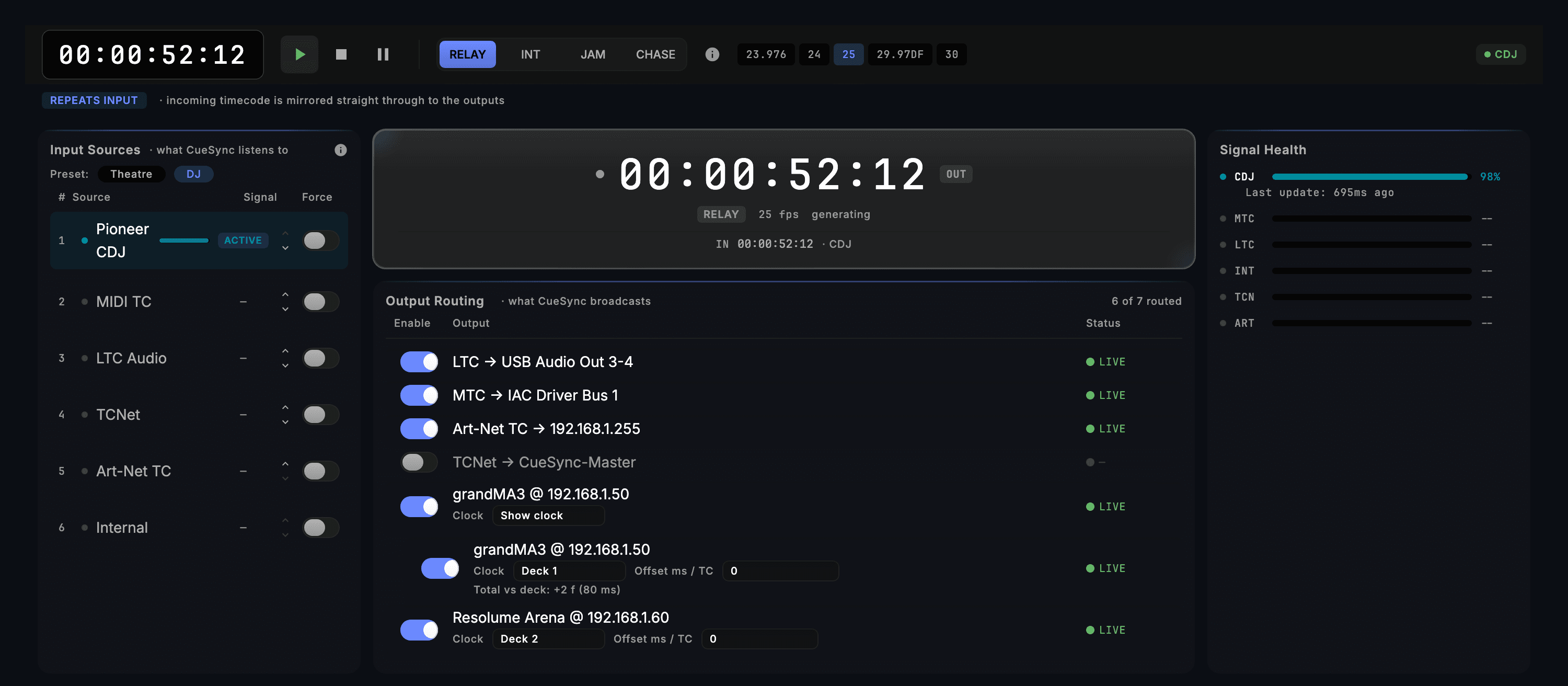
CueSync sends the show clock as LTC, MTC, Art-Net timecode and TCNet to the desks, servers and playback that chase it, and in Theatre, Production and the Show Editor plan it chases a house clock too.
Timecode spec sheet
| Speaks | LTC · MTC · Art-Net Timecode · TCNet |
|---|---|
| Built for | grandMA3 · ETC Eos · ChamSys MagicQ · Avolites Titan · QLab · disguise · Unreal Engine, through CueSync for Unreal · Any LTC or MTC receiverSends LTC, MTC, Art-Net timecode and TCNet, each to its published specification. |
| Editions | In DJTheatreProduction |
| Manual | /docs/connect/timecode |
The output is in every edition. A capability marked with an edition needs that edition.
What CueSync sends to Timecode
| Four Outputs, Every Edition | LTC on an audio output, MTC on one or more MIDI ports, and Art-Net timecode and TCNet on the network, from DJ, Theatre and Production alike. |
|---|---|
| Every Professional Rate | 23.976, 24, 25, 29.97 non-drop and drop-frame, and 30, plus 48, 50, 59.94 and 60 where the wire can carry them. |
| The Show Is the Clock | A show in Theatre, Production or the Show Editor plan can be the master: its audio playhead, or CueSync's own generator, runs the clock every other system chases. |
| Chase a House Clock | In Theatre, Production and the Show Editor plan, follow LTC, MTC, Art-Net timecode or TCNet (and in Production a CDJ itself), with a priority order, failover, and a freewheel that rides out a short dropout. |
| Every Route Says Where It Is | Each output row reads LIVE, IDLE, NO DEVICE, OFFLINE or SUSPENDED, so a route that is on but not arriving shows before doors. |
| Rehearsals Hold the Wire | DRY, Hold TC and a panic blackout park every timecode output on its frame, so a desk chasing CueSync fires nothing until you release. |
Set it up
Timecode with CueSync, in 5 steps.
- 1Open Settings → Timecode and give each output its device: an audio output for LTC, a MIDI port for MTC, a host for Art-Net timecode (broadcast by default), and TCNet.
- 2Set the frame rate to the one the receiving systems expect.
- 3Switch each route on in Output Routing (under Settings → Timecode, or on the Timecode screen) and check that it reads LIVE.
- 4To chase a house clock instead (Theatre, Production and the Show Editor plan), flip the show's TC role chip to Follower and turn the source on.
- 5Run a whole act against each receiving system in rehearsal, and read its clock against CueSync's before you rely on the route.
Timecode questions
Which editions send and chase timecode?
Every edition sends LTC, MTC, Art-Net timecode and TCNet. Chasing an incoming clock is in Theatre, Production and the Show Editor plan. Every paid plan has the Timecode screen's sending half: the clock, the mode and the output routing.
Can CueSync send timecode to more than one desk?
Yes. Every output runs at once, and Additional MTC Devices sends the same MTC stream to more MIDI ports, so lighting, sound and a second console can each have their own interface.
What happens when an incoming clock drops?
The clock coasts on its last rate for the freewheel window, five seconds by default, and a live lower-priority source takes over on its own. The show's recovery mode decides what a jump in the clock does.
Does Unreal Engine take CueSync's timecode?
Through the free CueSync for Unreal plugin. Paired once, it becomes the engine's timecode provider while CueSync sends locked timecode, and a Level Sequence can chase it.
Different question? Ask us directly.
Last reviewed .
Guides
Guides for this rig
Step-by-step guides for a show that runs with Timecode.
Run your next show on cue.
Download CueSync free and run the built-in demo show — press Space and watch each cue fire on screen with nothing sent to real equipment, no hardware required. Subscribe when you're ready to drive a real rig.
Product names on this page, including grandMA3, ETC Eos, ChamSys MagicQ, Avolites Titan, QLab, disguise and Unreal Engine, are the property of their respective owners and are used only to describe compatibility. Art-Net™ Designed by and Copyright Artistic Licence Engineering Ltd. CueSync is an independent product and is not affiliated with or endorsed by any of them.