Built for drama departments and community companies
Call the whole show from one screen. Every department on the same cue.
Build the cue list once in the Show Editor, then run it in Run Mode: the cue standing by, the running order and one GO. Cues fire on the stage manager's GO or on timecode, a musical runs from its own backing tracks, the crew follow along on any tablet backstage, and the cue sheets print for everyone.
A worked example: the opening of a school musical
Act I is one Part with the overture's backing track as its master audio. The timecode cues ride the track; the standby cues wait for the stage manager.
- 1.0Preset. House lights up, stage darkLX00:00:00:00
- 1.1House to halfLXSTBY
- 1.2Overture. The lights build with the bandLX00:00:12:00
- 1.3Projection: the town mapVX00:00:12:00
- 1.4Projection: the map closes in on the square, three seconds laterVXFOLLOW
- 2.0Scene change. Blackout, then the kitchenLXSTBY
STBY cues wait on the standby card for the call, and a second press inside a quarter of a second is ignored, so one GO is one cue.
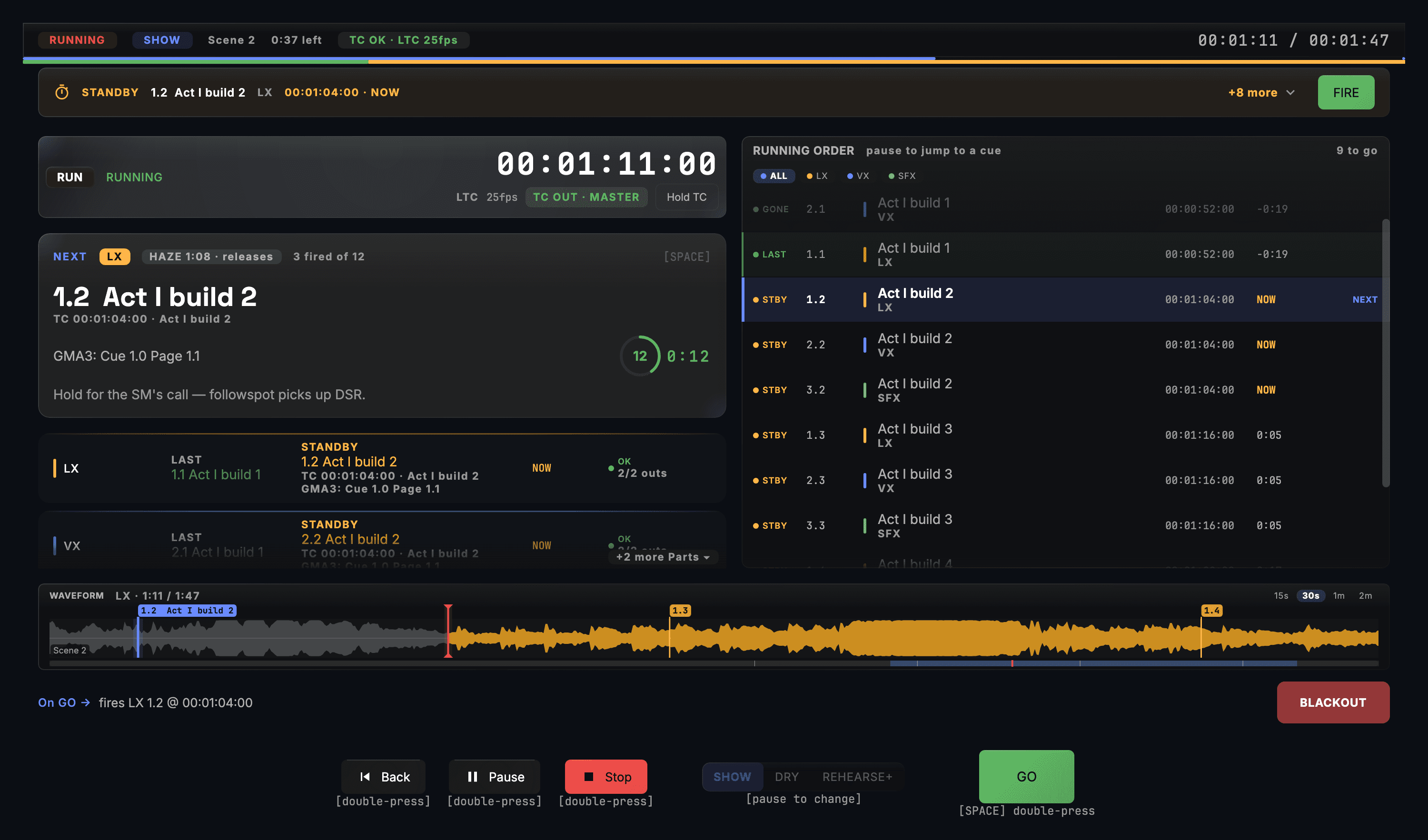
- A cue standing by with FIRE
- The running order with NEXT
- SHOW · DRY · REHEARSE+
What the show gets
Called on GO or on timecode
Each cue fires on the stage manager's GO, on the show clock, or after the cue before it. Run Mode shows the cue standing by, the running order with the last and the next cue, and one GO. Pause and Stop take a second press, so a stray key cannot end the act.
A musical runs from its own audio
Put the backing tracks on the show's timeline and they become the clock: lights, projection and sound land on the same bar every night. Suggest Cues can draft cue points from the music's phrases for you to keep or drop.
A crew board on any tablet
Scan a code and a tablet or phone backstage shows each department its current and next cue with a countdown, plus the stage manager's STANDBY and GO calls. Nothing to install, it runs over the venue Wi-Fi, and nothing on the board can move the show.
Cue sheets that print
The operator's list, the calling script, the running order and a sheet for each department, as PDF, HTML, CSV or Markdown. Every one of them opens without CueSync.
Rehearse without the rig
DRY steps through every cue and sends nothing; REHEARSE+ fires for real. A cue is marked Ready only after it has been test-fired since its last edit, and the pre-show check names the ones that are not.
With a desk, or without one
CueSync fires the school's lighting desk over its own protocol, or drives the fixtures directly over Art-Net or sACN through a DMX node, with no desk at all.
The edition: Theatre
A play or a musical runs on a cue list, and the cue list is Theatre Edition: the Show Editor, Run Mode, the crew board, timecode and the paperwork. Every edition connects to every output protocol.
- TheatreThe cue list, Run Mode, timecode in and out, the crew board and the cue sheets, with every output protocol.
- ProductionAdds the music-following side, AutoPilot and the decks, for a company that also runs dance nights.
- DJLights that follow a DJ set. It has no Show Editor or Run Mode, so it is not the edition for a play.
School and community theatre questions
Do the crew need an app?
No. Each tablet or phone opens the crew board in its browser from a QR code, over the venue Wi-Fi. Pin it to the home screen, and set a dedicated cue-light tablet's auto-lock to never before the show.
We have no timecode. Does that matter?
No. A new Theatre show makes its own clock, and a show called entirely on GO needs none. If the sound desk or a playback machine sends timecode, CueSync can follow it instead.
Can we prepare on one Mac and run the show on another?
Yes. A licence registers 2 Macs, and one of them drives the show at a time. Move the show between them as a file; a show opened on another computer starts with its network outputs held until you press Connect.
Can students learn it before they have a licence?
Yes. Without a licence anyone can run the demo show and tour the app in read-only mode, its Show Editor and Run Mode included. Building and saving your own shows, and connecting real outputs, need a subscription.
Call the demo show before your first rehearsal.
Download CueSync to run the demo show and tour the app in read-only mode. Compare the editions on the pricing page.