Integration · Control surfaces · Launchpad & APC Grids
Sixty-four RGB cue pads under your fingers.
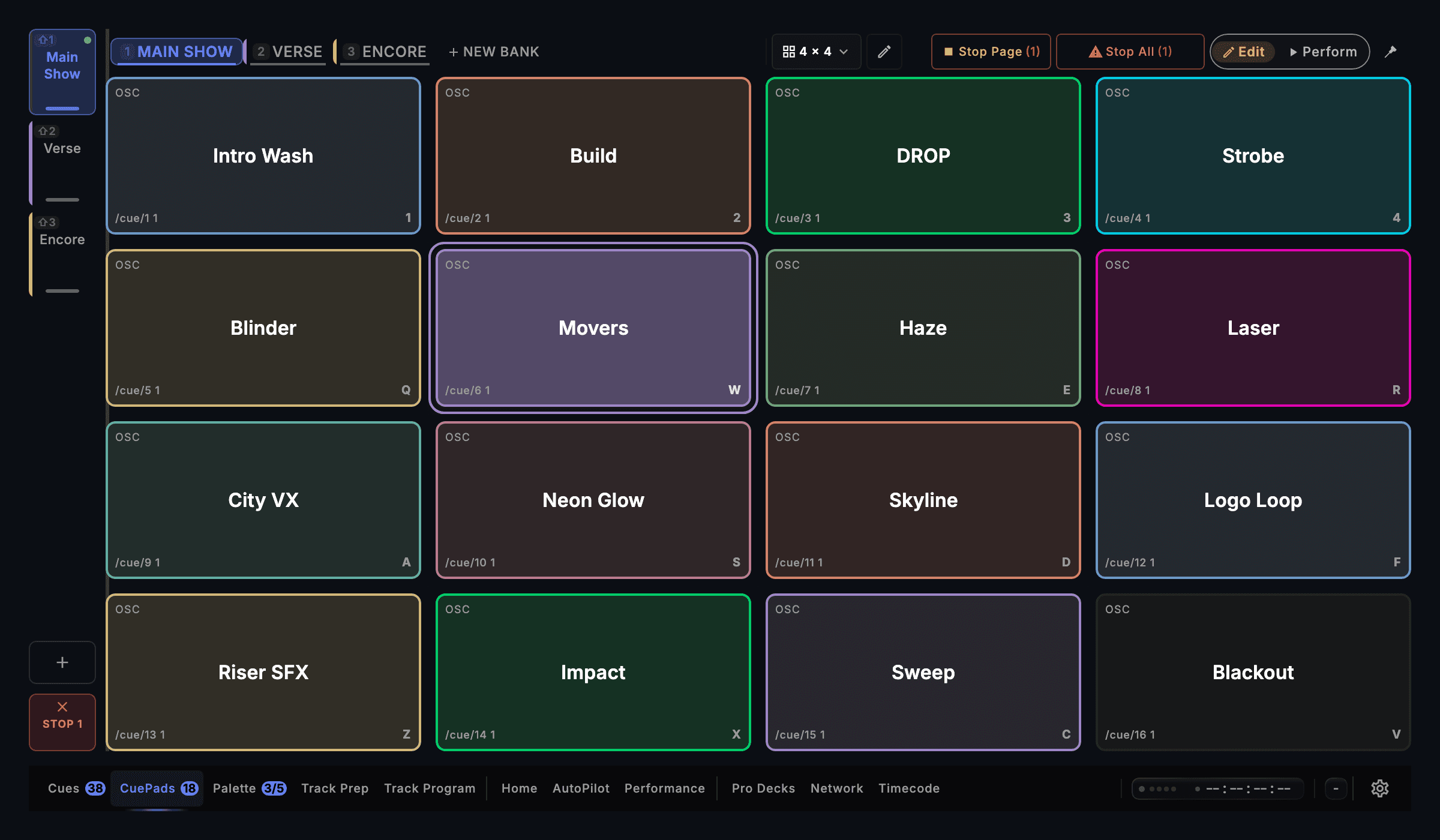
Plug a Novation Launchpad or Akai APC grid in over USB or wireless Network MIDI, pick it in Settings → MIDI & Sync → Grid Controller, and play your Cue Pads with live RGB state feedback and zero external mapping software.
Launchpad & APC Grids spec sheet
| Speaks | USB MIDI · Network MIDI (RTP-MIDI) |
|---|---|
| Built for | Novation Launchpad X · Novation Launchpad Pro MK3 & Pro MK2 · Novation Launchpad Mini MK3 (plus MK2 / S) · Akai APC40 mkII · Akai APC mini & APC mini mk2 · Generic 8×8 USB or Network MIDI gridsIncluded in every CueSync edition over USB MIDI or macOS Network MIDI (RTP-MIDI). The original Akai APC40 is not supported as a grid. |
| Editions | In DJTheatreProduction |
| Manual | /docs/connect/midi-controllers |
The output is in every edition. A capability marked with an edition needs that edition.
What CueSync sends to Launchpad & APC Grids
| Automatic Grid Initialisation | CueSync recognises detected grids by name and sends the setup message each needs — switching Launchpads into Programmer Mode and the APC40 mkII into full-LED mode automatically. |
|---|---|
| Live RGB State & Health LEDs | Assigned keys light in each pad's colour and track idle, armed-for-downbeat, queued, active, and flashing-red output-not-answering states in real time. |
| Hold Modes That Follow Your Finger | Flash, Phrase Latch and Repeat pads stay held while your finger is down and release cleanly the moment you lift it. |
| APC40 mkII Faders & Transport | Map APC40 mkII faders as conditioned MIDI CC targets such as master intensity, use PLAY for GO and STOP for Freeze, and jump banks 1–5 from Scene Launch buttons. |
| Wireless & iPad Grids | Bring an iPad grid app or wireless MIDI pad surface in over macOS Audio MIDI Setup and select it under Settings → MIDI & Sync → Network MIDI (Wireless). |
| Generic 8×8 LED Profile | Other 8×8 MIDI pad controllers mirror bank colours by slot position through Hardware LED Feedback using Generic (Velocity) or Launchpad RGB profiles. |
Set it up
Launchpad & APC Grids with CueSync, in 5 steps.
- 1Connect your Novation Launchpad or Akai APC over USB (or join a wireless session in macOS Audio MIDI Setup for Network MIDI). Quit Ableton Live or vendor editors first so they do not hold the MIDI port.
- 2Open Settings → MIDI & Sync → Grid Controller and pick your controller by name. The card reads Grid controller active once initialised.
- 3Open Cue Pads, switch to Edit mode, right-click a pad, choose Assign MIDI… and press the pad on the controller. The hardware key lights in the pad's colour immediately.
- 4On an APC40 mkII, map faders to targets such as master intensity, and step banks with Scene Launch 1–5 or Bank ◀ / ▶.
- 5For third-party 8×8 grids, choose Generic (Velocity) or Launchpad RGB under Controller Profile in the Hardware LED Feedback card and pick the Output Device.
Integration details
Specifics that hold up in production
What CueSync's Launchpad & APC Grids integration does and how it behaves — the things you can check before the show.
- Pin MSC and MIDI action ports when a grid is attached
- CueSync claims the grid controller as a MIDI device and drives its LEDs over MIDI output. When you also use MIDI Show Control or unaimed MIDI actions, pin the MSC output port by name under Network → Outputs so cues never route to the pad grid.
- Built for live-show reliability
- Every output connection recovers automatically, connection state is visible to the operator, and every failure CueSync can detect is reported during a show. A held cue is released automatically if the window loses focus mid-flash.
Launchpad & APC Grids questions
Which Novation Launchpad and Akai APC models work with CueSync?
Novation Launchpad X, Launchpad Pro MK3, Launchpad Pro MK2 and Launchpad Mini MK3 (with legacy Launchpad MK2 and S mapped to the closest profile), plus Akai APC mini, APC mini mk2 and APC40 mkII. The original Akai APC40 is not supported as a grid.
What does a flashing red key on the Launchpad or APC mean?
Flashing red is the highest-priority LED state: it warns that the network output targeted by that pad has stopped answering. Check Network ▸ Devices; once the output answers again, the key returns to the pad's colour.
Does pressing a pad harder change brightness or fixture intensity?
No. Pad presses carry MIDI velocity, and CueSync intentionally ignores velocity scaling on Cue Pads and master intensity so a hurried hit mid-show never fires a look half-dim. Use an APC40 mkII fader for continuous intensity rides.
Can I use an iPad or wireless MIDI grid controller?
Yes. Enable the session in macOS Audio MIDI Setup, then pick the peer under Settings → MIDI & Sync → Network MIDI (Wireless) and select it as your grid.
Different question? Ask us directly.
Last reviewed .
Guides
Guides for this rig
Step-by-step guides for a show that runs with Launchpad & APC Grids.
Run your next show on cue.
Download CueSync free and run the built-in demo show — press Space and watch each cue fire on screen with nothing sent to real equipment, no hardware required. Subscribe when you're ready to drive a real rig.
Launchpad is a trademark of Focusrite Audio Engineering Limited. Akai Professional and APC are trademarks of inMusic Brands, Inc. CueSync is an independent product and is not affiliated with or endorsed by Focusrite, Novation, inMusic or Akai Professional.