Integration · Control surfaces · Elgato Stream Deck
Your cue pads and GO, on hardware keys.
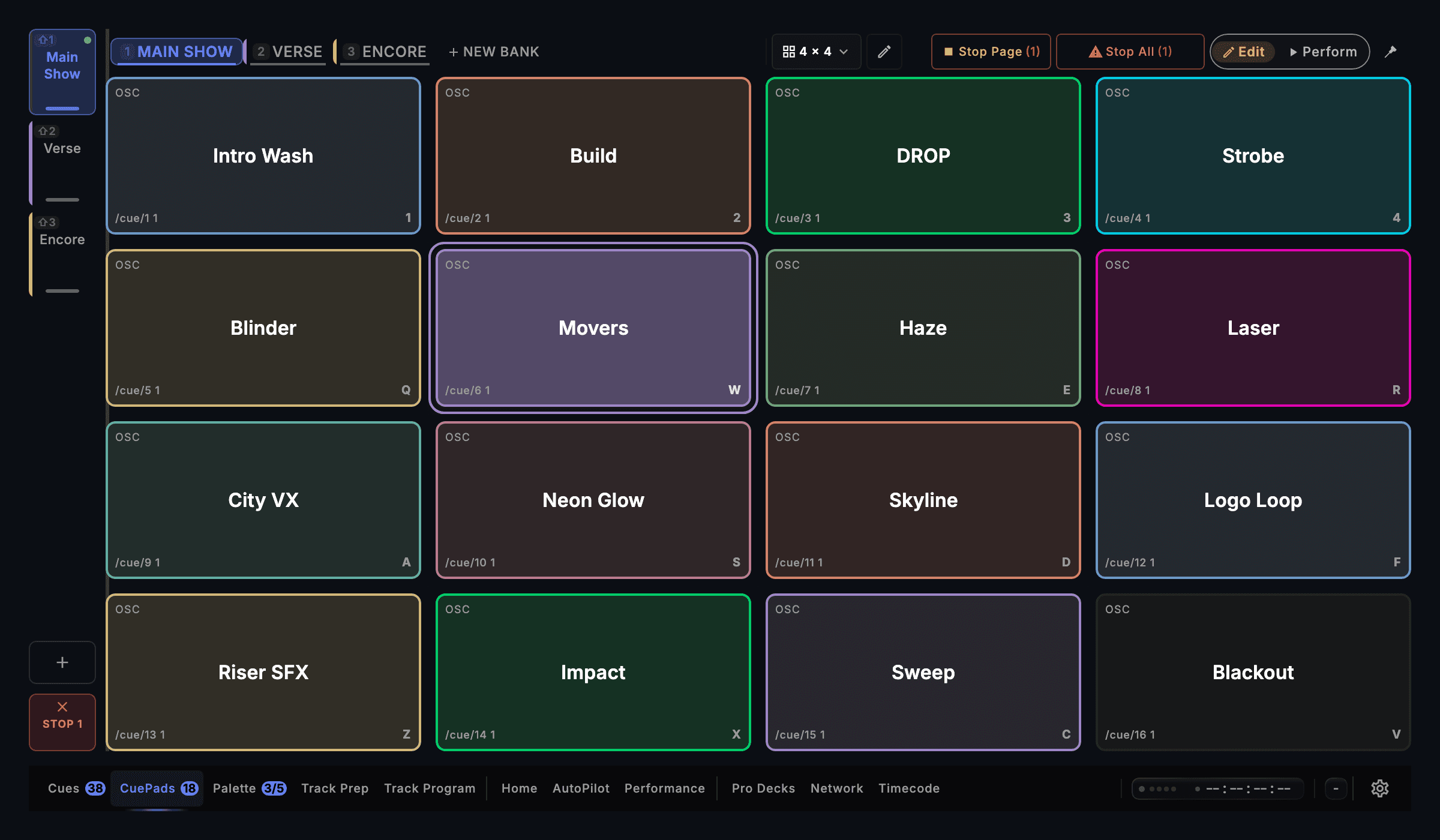
CueSync drives an Elgato Stream Deck directly over USB as a physical cue surface: keys mirror your Cue Pads, Palette looks, Local Audio transport or AutoPilot steering with live names, colours, icons and run-state, plus hardware GO, STOP and bank switching. No Elgato software, no Companion, no plugins.
Elgato Stream Deck spec sheet
| Speaks | USB HID |
|---|---|
| Built for | Stream Deck XL (32 keys) · Stream Deck MK.2 / V2 & original (15 keys) · Stream Deck + (keys, dials & touchscreen) · Stream Deck Neo (keys & bank buttons) · Stream Deck Mini & Mini MK.2 (6 keys) · Stream Deck PedalDrives supported Stream Deck models directly over USB in every CueSync edition, with no Elgato app or plugin in between. Stream Deck Studio is not supported. |
| Editions | In DJTheatreProduction |
| Manual | /docs/connect/stream-deck |
The output is in every edition. A capability marked with an edition needs that edition.
What CueSync sends to Elgato Stream Deck
| Live Cue Pads & Palette Looks | Keys mirror your current Cue Pads bank or Palette looks slot by slot with live pad names, colours, built-in action icons, armed/queued states and red press-missed feedback. |
|---|---|
| Hardware GO, STOP & Bank Keys | The bottom row gives you bank switching, STOP and a GO key showing the next cue's name and countdown, with on-key CONFIRM framing when double-press safety is active. |
| Stream Deck + Dials & Touch Strip | Dial 1 rides master intensity (±2% per detent, press-hold to snap full), Dial 4 engages or fades Blackout, and the touchscreen shows live BPM, MASTER % and NEXT cue with swipe bank switching. |
| AutoPilot & Local Audio Pages | Hold the bank-label key for half a second to flip between Cue Pads, Palette, Local Audio transport and AutoPilot steering (Pause/Resume, Hold 1 or 4 phrases, Skip, Force Fire and XL frame nudge). |
| Stream Deck XL Show Row | The 8-column XL adds dedicated PREV/BACK, one-press BLACKOUT (two-press RELEASE?), and context-aware PLAY/PAUSE/RESUME, AUTOPILOT or MASTER keys. |
| Stream Deck Pedal Beside Any Deck | Connect a Stream Deck Pedal on its own or alongside any display deck: the middle stomp is a hands-free GO through the same confirmation gate, while side pedals stay unmapped against mis-stomps. |
Set it up
Elgato Stream Deck with CueSync, in 5 steps.
- 1If the Elgato Stream Deck app is installed, quit it or disable the specific deck under Preferences → Devices (USB HID devices have one owner at a time).
- 2Plug the Stream Deck into your Mac over USB, open Settings → Stream Deck in CueSync, and switch on Enable Stream Deck (off by default).
- 3Leave Auto-connect on so the deck lights up within a few seconds and reconnects automatically if replugged.
- 4Choose what the pad area mirrors under Keys show — Cue Pads, Palette, Set or AutoPilot — or hold the hardware bank-label key for half a second to cycle pages.
- 5Optional: set a concise key caption (up to 24 characters) in a pad's Appearance → Stream Deck label without changing its name on screen or Show Companion.
Integration details
Specifics that hold up in production
What CueSync's Elgato Stream Deck integration does and how it behaves — the things you can check before the show.
- Direct USB HID surface — zero middleware
- CueSync renders key bitmaps, transport counters and live pad borders directly over USB HID. Turning on Test card paints a 20-second keycap margin and colour ruler across the hardware while holding presses inert.
- Built for live-show reliability
- Every output connection recovers automatically, connection state is visible to the operator, and every failure CueSync can detect is reported during a show. A held cue is released automatically if the window loses focus mid-flash.
Elgato Stream Deck questions
Do I need the Elgato Stream Deck app or Bitfocus Companion installed?
No. CueSync speaks to the Stream Deck directly over USB HID with built-in icons, colours and transport layouts. Because USB HID devices have a single owner, quit the Elgato app (or disable that deck in Elgato Preferences → Devices on app version 7.1+) before switching on Enable Stream Deck in CueSync.
Which Elgato Stream Deck models are supported?
Stream Deck (original), Mini and Mini MK.2, V2/MK.2, XL, Neo (keys and both hardware bank buttons), Stream Deck + (keys, rotary dials and touchscreen strip), and Stream Deck Pedal. Stream Deck Studio is not supported; CueSync identifies it in Devices and reports that it cannot drive it.
Can I use a Stream Deck Pedal at the same time as an XL or Stream Deck +?
Yes. One display deck connects at a time, and a Stream Deck Pedal connects alongside it simultaneously. The middle pedal acts as a hands-free GO using the same DJ or Show transport mode and double-press confirmation gate as the desk.
How does hardware Blackout prevent accidental release?
Engaging BLACKOUT on a Stream Deck XL, 15-key Show row or Stream Deck + Dial 4 is a single press that darkens every blackout-capable output at once. Releasing requires a second press within two seconds while the key reads RELEASE?, preventing a stray brush from restoring console grand masters mid-scene.
What happens if the USB cable is pulled while holding a Flash pad?
CueSync raises a Stream Deck disconnected notification, safely releases any held Flash or Phrase Latch pads the instant the USB link drops, and reconnects automatically when the cable returns.
Different question? Ask us directly.
Last reviewed .
Guides
Guides for this rig
Step-by-step guides for a show that runs with Elgato Stream Deck.
Run your next show on cue.
Download CueSync free and run the built-in demo show — press Space and watch each cue fire on screen with nothing sent to real equipment, no hardware required. Subscribe when you're ready to drive a real rig.
Elgato and Stream Deck are trademarks of Corsair Memory, Inc. CueSync is an independent product and is not affiliated with or endorsed by Corsair or Elgato.