Art-Net and sACN (DMX over IP)
AllWhat it's for — Art-Net and sACN (also called E1.31) carry DMX levels over an Ethernet network. A CueSync output of either kind sends channel levels from your cues, pads, Looks and fades straight to a node or receiver — a dimmer rack, a set of house lights, an LED-wall processor — with no lighting desk in between. This page covers the output side. The built-in RGB pixel wall uses the same two protocols on its own transport and is documented on Pixel Wall. Receiving DMX from a desk is a different feature, covered in OSC, DMX and Remote Inputs.
Experimental. Both outputs put real packets on the wire, and the packet layouts are built to Art-Net 4 and E1.31. Nobody has yet confirmed that a fixture moves when CueSync sends to it. Do the one-node test in Use cases below against your own node before you plan a show around either protocol.
How a DMX output behaves
Four facts explain almost everything on this page.
- One output is one destination. An Art-Net output sends to one node address. An sACN output sends to one multicast stream per universe, or to one unicast address. A second node or a second receiver is a second output.
- Every packet carries all 512 channels of a universe. CueSync keeps the levels of each universe it has addressed. A cue that sets channel 5 changes channel 5 in that held copy, then sends the whole universe. Channels nothing has written are sent as 0.
- A look is held for you. A universe that has gone quiet is re-sent regularly, so the node never starts its loss-of-signal timer on a look you are still holding. CueSync holds every universe the output has driven since it connected.
- "Connected" means the socket opened. The output has no handshake and UDP has no acknowledgement, so a green output proves CueSync sent the packet, not that anything received it. Diagnostics files a DMX output whose host does not answer a ping as Not verified, not as a fault.
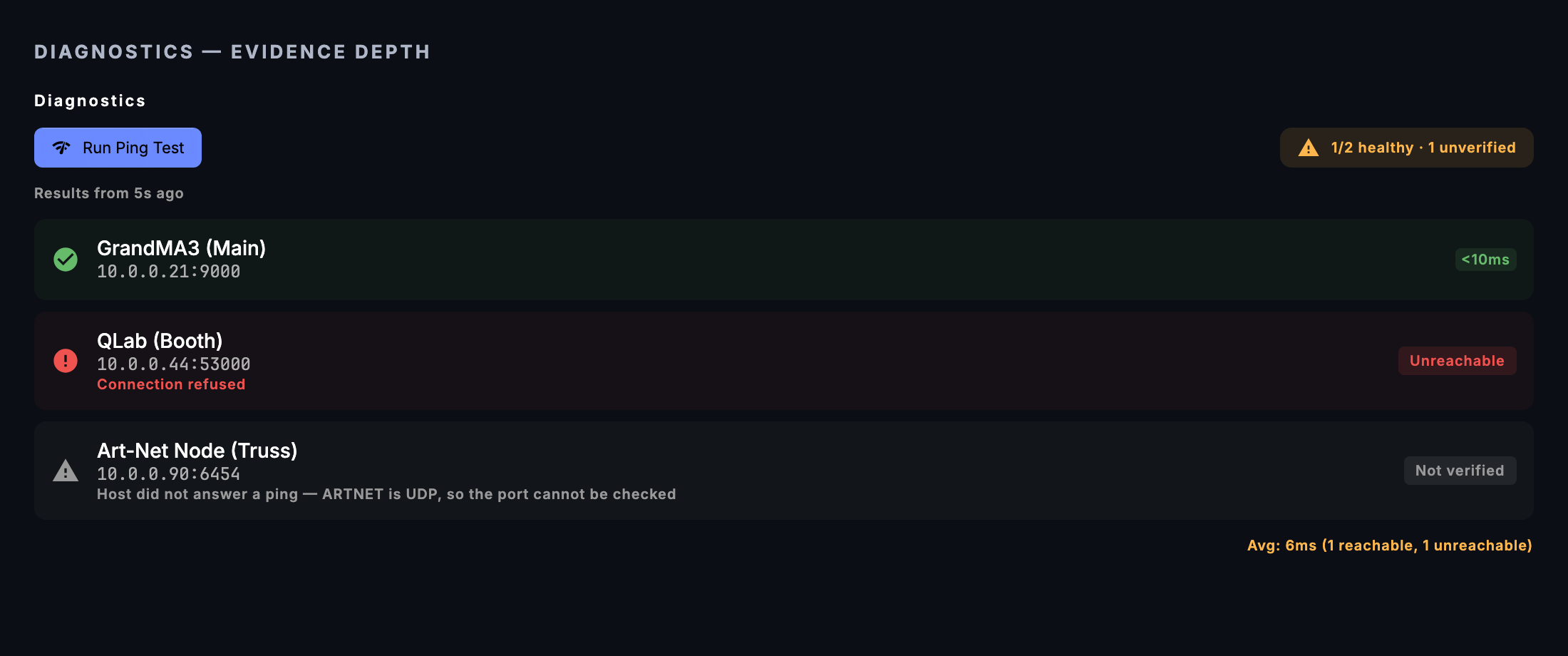
Two badges on the output card tell you when the output itself is in trouble. Not reaching the wire appears when CueSync repeatedly could not put every held universe on the network, for example after the DMX switch loses power. On OS default NIC appears when you pinned an interface and it has gone, for example a USB adapter that renumbered; frames keep flowing, but out of the wrong adapter, and CueSync re-binds the moment the pinned one returns. Both raise one toast, and both clear themselves.
Add the output
- Choose Output → Add Output… (or Quick Add → Lighting → Art-Net DMX / sACN DMX, or the + on Network → Outputs).
- Pick Art-Net (DMX) or sACN (E1.31).
- Fill in the fields below, then save. The output connects at once.
| Field | Art-Net | sACN |
|---|---|---|
| Host / IP Address | The node's address. Every packet goes here. | Required to save. In multicast mode each universe goes to its own multicast group instead (see sACN multicast below); with Unicast to this address on, every universe goes here. |
| Port | 6454 | 5568 |
| Interface | Bind Interface: which adapter the packets leave from. Pin it when the machine has Wi-Fi and a lighting network, because some nodes filter by source address. | Multicast Interface: which adapter the multicast leaves from. It does not apply in unicast mode. |
| Default Port-Address / Default universe | Blank means 0. Range 0–32767. | Blank means 1. Range 1–63999. |
| Merge priority | Not in Art-Net. | Blank means 100. Range 0–200. |
| Unicast to this address | Not offered. Art-Net always goes to the host. | Off (multicast) is standard E1.31. Turn it on for a unicast-only receiver, or across a routed segment with no IGMP querier forwarding the group. |
Blank fields mean "the protocol default", and an action that names its own universe or priority overrides the output's. A value outside the range turns the field red and blocks Save; it is never quietly changed to a legal one.
sACN multicast. Each universe goes to its own group, 239.255.<high byte>.<low byte> of the universe number, on port 5568, so a receiver joins only the universes it wants. The output also announces which universes it is driving at regular intervals, as E1.31 asks. When you close the output or quit, it sends stream-terminated packets so a receiver can drop CueSync from the merge at once instead of waiting out the timeout.
Pixel wall on the same universe. If the wall already drives the universe you type, the dialog shows a This universe is the pixel wall's notice. Two senders on one universe make the node merge or flip between them. Move one of them.
Universe numbering
The two standards count differently, and the numbers you type must follow the wire you chose.
| Art-Net | sACN | |
|---|---|---|
| Name | Port-Address, flat 15-bit: Net × 256 + Sub-Net × 16 + Universe | Universe |
| First | 0 | 1 |
| Last | 32767 | 63999 |
Two consequences:
- A node's own "Universe 1" on Art-Net is Port-Address 1. A node set to Net 1, Sub-Net 0, Universe 3 is Port-Address 259. Type the flat number.
- sACN has no universe 0. A cue or an output naming universe 0 on sACN is refused.
Out of range is refused, not clamped. An Art-Net action naming Port-Address 40000 sends nothing and the cue reports a failure. The cue editor names the legal range beside the field. This is deliberate: clamping would have put the levels on a real, differently-patched universe and still reported success.
What a DMX action can do
Add an action to a cue with Add Action. Either open your Art-Net or sACN output under Your outputs and choose Art-Net or sACN (this pins the action to that output), or type the name into the Search actions… box and press Enter. The action does one of four things. If several are set, the first that applies wins, in this order:
| Order | Set | What is sent |
|---|---|---|
| 1 | Blackout ticked | All 512 channels of the target universe to 0, then the universe is sent. With All universes this output has driven also ticked, every universe the output has driven is zeroed and sent, not only the named one. |
| 2 | Full On ticked | All 512 channels of the target universe to 255, then sent. |
| 3 | A channel map (Looks only, see below) | Just those channels are set, then the universe is sent. |
| 4 | Channel 1-512 and Value 0-255 | One channel is set, then the universe is sent. |
If none of these is set, the cue reports "Art-Net action has no DMX operation" (or the sACN equivalent) instead of a green fire. Values are 0–255, not percent. The row in the cue list reads Ch5@255, Blackout, Full On or 12 channels, and Channel (incomplete) when only one half of channel and value is filled in.
Other fields:
- Universe / Port-Address (Art-Net) or Universe (sACN). Blank means the output's default. This is how one output drives several universes.
- Priority 0-200 (sACN only). Blank means the output's default. It is sent with that one send and never changes the output, so one elevated cue cannot raise the rest of the show. A panic blackout is sent at the priority the universe was last sent with, so a console at a lower priority cannot hold the universe up.
- Send to every Art-Net output / Send to every sACN output. Off means the action goes to the output you pinned, or to the first connected output of that protocol. On sends to all of them.
Blackout and Full On address one universe (the named one, or the output's default). They are not a rig-wide switch unless you tick All universes this output has driven beside Blackout. The automatic blackouts (Auto Pilot's Blackout, the Blackout pad, a CUT transition) stay one universe on purpose: Art-Net and sACN have no restore, so a rig-wide automatic blackout would leave every universe dark until a cue writes it back. The Panic blackout is wider, and is described below.
Fades. Fade (OSC ramp) can ramp a DMX channel. It is not listed under an Art-Net or sACN output, so add it by typing fade in the Search actions… box. Do not pick it from a Custom OSC, Resolume, grandMA3 or QLab output: that pins it to that output, and a DMX target then fails with a message that the cue is routed to the wrong protocol. Choose the target Art-Net channel or sACN channel, enter the channel, the universe (blank means the output's) and, for sACN, a priority. From % and To % map to 0–255 (100 % is 255). The duration is in beats or in milliseconds. Panic and Stop cancel every running fade, so a ramp cannot write the rig back up after a blackout.
Looks. A DMX Look in the Palette holds a channel map: pick sACN (the default) or Art-Net as its protocol, a universe, and a table of channels and values. Firing it sets only those channels. Releasing it (a panic, a track change, a release group) writes those same channels to 0, or up to the venue's floor if one is set. A single-channel Art-Net or sACN action has no derived release. A DMX Look's tile reads SENT, because a DMX output cannot report back. See Looks and Scenes.
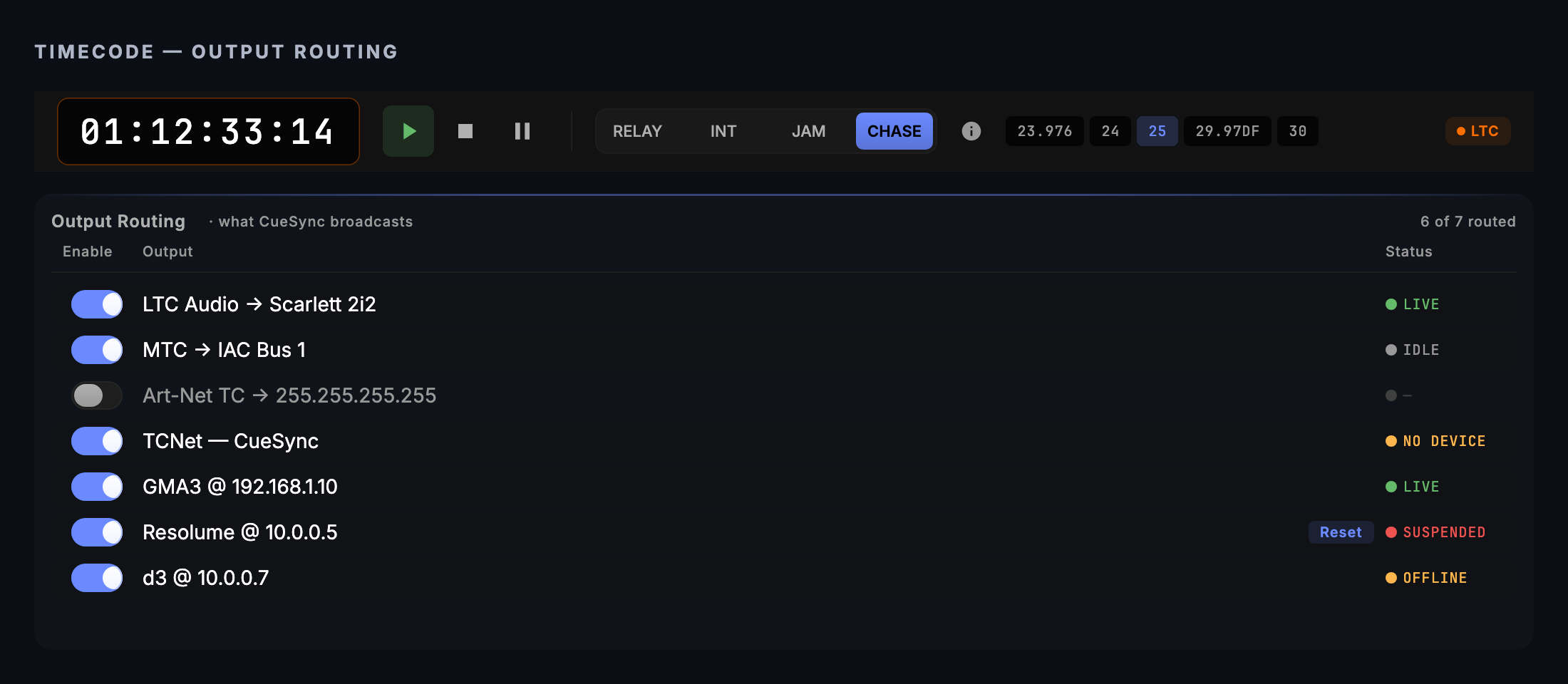
Timecode. Timecode can also leave on these protocols. Timecode → Output Routing has an Art-Net TC row that sends an ArtTimeCode packet, and an sACN row that writes six consecutive channels (hours, minutes, seconds, frames, rate code, running) starting at a Start ch you choose, 1–507. The Timecode Command action can also target Art-Net. See Timecode.
The venue's ceiling and floor
A venue profile can cap what a room allows on DMX. In Settings → Venues, open the profile and expand Output policy:
- Governed channels — one universe per line,
universe: channels, for example1: 1-4, 21. Only these channels are governed. A line governs its number on both wires, so1:caps Art-Net Port-Address 1 and sACN universe 1, and0:reaches Art-Net only. - Maximum level (0–255) and Floor level (0–255) — governed channels are held between them.
- Strobe cap — flashes per second, for the pixel wall's Strobe look and for your Followers. It does nothing for a strobe channel on a conventional fixture, which is just a level.
The levels are enforced on everything the output sends, so a cue, a fade, a Look, Full On and the pixel wall all pass through them. Three rules matter on the night:
- Name intensity channels only. A ceiling on a pan channel restricts movement, and a floor on a colour channel tints the rig. An empty field governs nothing.
- The floor applies to writes, and panic is not blocked by it. An emergency blackout still goes to zero. A channel that nothing writes stays where the panic left it.
- The policy binds only while its venue is active. A typo refuses the whole field rather than applying the part that parsed, and a floor above the maximum is refused.
More on venues is in Venue Profiles.
Blackout, panic and fades
Panic → Blackout All Outputs (Cmd+Shift+B) zeroes every universe the output has driven and sends each one at once, on every connected Art-Net and sACN output. It does not stop at the output's default universe. It also cancels running fades.
Releasing the blackout does not bring the levels back. CueSync cannot know what your levels were, and the universes stay at 0 until a cue writes them again. Fire your look again after a release. Freeze Outputs holds the current look and does not send zeros.
Use cases
1. The one-node test (do this before anything else). This is the check the beta label is waiting on.
- On the node, note its Port-Address (Art-Net) or universe (sACN), and which DMX channel is patched to one dimmer or fixture. Make sure nothing else — a desk, MA3 onPC, a visualiser, CueSync's own pixel wall — is sending to that universe.
- Output → Add Output…, pick Art-Net (DMX) or sACN (E1.31), enter the node's IP, set the default Port-Address or universe to match the node (blank means 0 or 1), and save.
- On Cues, press
+, set the trigger to Manual, click Add Action, open your output under Your outputs, choose Art-Net (or sACN), and enter Channel as the patched channel and Value255. Leave Universe blank. Save the cue. - Hover over the row and click the play icon to test-fire it.
- You should see the fixture go to full. Edit Value to
0and fire again; it should go out. If nothing moves, check the node's Port-Address, the source-address filtering, and that the machine and node are on the same subnet. Desk Verification has the same check as a checklist.
2. A single-universe dimmer rack.
- Add one Art-Net output for the rack's node, Port-Address matching the rack.
- For each circuit group, add a pad or cue with an Art-Net action: Channel the first dimmer, Value the level.
- For a slow bring-up, add Fade (OSC ramp) from the search box, choose the Art-Net channel target, enter the channel, set From %
0, To %100and a duration in ms. - You should see the dimmer rise over the duration and hold. The output keeps re-sending it, so it survives a quiet stretch of the show.
3. House lights by channel, capped by the room.
- In Settings → Venues, open the venue and expand Output policy. Under Governed channels enter
2: 1-4, set Maximum level to200, and save. - Activate the venue. The policy is not enforced while it is inactive.
- In the Palette, create a DMX Look on universe 2 (protocol sACN or Art-Net, to match your output) with channels 1–4 at 255, and fire it.
- You should see the four channels reach 200, not 255. Releasing the Look drops them to the floor (0 if you set none).
4. Colour-order test on a wall processor or RGB fixture.
- Create four DMX Looks on the wall's universe: red is channel 1 = 255, 2 = 0, 3 = 0; green, blue and white the same way.
- Fire them in turn.
- You should see red, green, blue, white. If red shows as green, the device wants GRB order; patch it that way. For a whole LED wall with many universes, use the Pixel Wall, which has a rainbow Identify for this.
5. Which universe is this cable carrying?
- Switch on Settings → Advanced → Show the Diagnostics screen and restart CueSync, then open Diagnostics (
Cmd+Shift+D). - Fire a cue at each universe once, so the output has driven it. Then press Identify DMX Universes → Start with the show stopped.
- Plug a DMX tester into the cable. The value it reads on channel 512 is the universe number. Press Stop, or let it stop itself after five minutes.
Tips & gotchas
- ⚠ The starter Art-Net "Blackout" pad releases with Full On. Its release action sets every channel of the universe to 255, including pan, tilt, colour and gobo channels, and only a venue ceiling on named channels limits it. Replace the release on any rig with more than dimmers.
- Two senders on one universe. A desk and CueSync, or the wall and an output, make the node merge. Art-Net has no priority; the outcome depends on the node. sACN receivers follow the higher priority, so a blank output priority of 100 against a console at 100 is a tie you should settle deliberately.
- A repeated identical channel value is skipped. CueSync does not re-send a single-channel action whose value has not changed since its last send. If someone moves the channel at the node, firing the same level again may do nothing. A different value, a blackout, a channel map, a track change or a panic resets that.
- Green does not mean delivered. UDP has no acknowledgement. Verify at the fixture, not on the cue row.
- A show saved on another computer opens with these outputs held. An Art-Net or sACN output stays off until you press Connect in the notice (or switch it on from Outputs), so a show from a stick or a shared folder cannot start sending DMX before you have seen where. An sACN multicast output is listed as multicast with its group address, with or without a host, and an output left on port 0 is listed at its protocol's default port. See Network Outputs.
- sACN unicast ignores the interface picker. The Multicast Interface only applies in multicast mode.
- Unwritten channels are 0. The first cue on a universe sends 511 zeros beside your one channel. On a shared universe that can pull down other people's levels.
- The Diagnostics identify tool only lists universes the output has already driven. It never opens a universe you have not used, and it refuses a universe above 255 by name, because one channel cannot state that number.
What has been checked
Both protocols emit real traffic built to the published ArtDmx and E1.31 formats. No fixture has ever been confirmed to move on a real node, so both stay labelled experimental. What is missing is one observation: one node, one universe, one channel to full (the same check is on Desk Verification). Run the test above and report what you see before relying on either output in a show.
Related
- Pixel Wall — the built-in RGB wall that uses Art-Net and sACN on its own transport
- OSC, DMX and Remote Inputs — receiving DMX and OSC to fire cues
- Network Outputs — adding, testing and monitoring outputs
- Venue Profiles — the Output policy and activating a venue
- Diagnostics — Identify DMX Universes and connection history
- Timecode — Art-Net and sACN timecode output
- Protocol Reference — ports and how far each protocol is proven
- What Each Action Can Send — the verb list for Art-Net and sACN actions
Looking for a quick fix?
The Help Center has short task-focused articles and a support team that responds within 24 hours.