Intents and Actions
AllWhat it's for — CueSync has two ways to say what a cue does. An action is one exact command for one kind of gear. An intent says what you want ("black out", "set a look", "strobe") and lets CueSync work out the commands for whatever is connected in the room you are standing in. This page explains both, how a venue profile steers an intent, what happens when nothing can carry it out, and how Looks fit in.
Actions, intents and Looks side by side
| Action | Intent | Look | |
|---|---|---|---|
| What it is | One typed command for one protocol: a grandMA3 Goto, a Resolume clip, a QLab GO | A protocol-neutral instruction: Blackout, Set Intensity, Set Visual | A named stage state in the Palette, fired by a Look action |
| Decided when | You author it | The moment it fires | You author it; you can re-point it mid-show |
| Adapts to the room? | No. It goes to its own protocol. | Yes, through the active venue profile | Not by itself. Its binding decides the target, and one edit re-points every cue and pad that fires it. |
| Where you make one | Add Action in a cue, pad or Look editor | Show Editor cue dialog; Show Themes; Auto Pilot profiles; venue mappings | Palette |
| Released by panic and track change? | Not individually. Panic's protocol-wide blackout still reaches the gear. | Resolves to actions, so the same | Yes for tracked Looks. Each is released by its own Off. |
What an action is
An action is one typed command: a grandMA3 executor Go, a Resolume clip trigger, an Art-Net channel value. Add Action offers 28 types. Each type has its own fields, and the Action Reference lists them. What Each Action Can Send lists the verbs.
Where it goes. An action names its output in one of three ways:
- No output chosen. The first available output of that protocol takes it. With two identical consoles that means whichever was found first, so pin it.
- One output. The Add Action menu is output-first. It opens on Your outputs, and picking one pins the action to it. No output needed lists the actions that reach no output (Wait, Look, Cue Reference, Audio File, Pixel Wall, MIDI, Generic OSC). Other protocols holds the rest.
- Every output of the protocol. Tick the box at the bottom of the action that reads Send to every … output and names the action's type, such as Send to every GrandMA3 output. Turning it on clears any pin.
A Theatre cue is also re-targeted by its Part's or lane's routing when it fires, so the lane decides which desk hears it.
One operation per action. Console and media-server actions can hold settings for more than one verb, and CueSync sends exactly one of them. On a grandMA a raw command line wins over every verb, and a bare Go is what an action with nothing set sends. The same one-operation rule holds for grandMA2, ETC Eos, ChamSys MagicQ, Avolites, QLab, disguise, MIDI Show Control, Pangolin and VIOSO. Pixera refuses an action that names more than one operation. Fields left over from another verb are discarded, not sent as well. The Sends: line above a grandMA action shows the one thing it will send, and the Resolume, QLab and several other editors show a Won't send — line naming what will be dropped. Read them before you save.
Some actions that would do something other than what they say are refused by name:
- A blank raw command, fixture, macro name or preset pool on grandMA3 is refused with the empty field named, because a blank one would have fallen through to a Go on the desk. A speed master with no BPM is refused the same way. An Effect is refused on grandMA3 whatever its fields: the desk has no effect pool, and
Effect nselects fixtures of the Effect ID type instead (see the grandMA3 page). - A blank command or a fixture with no level on grandMA2, a half-filled fader on Eos and a playback verb with no playback on MagicQ are refused too.
- Resolume and QLab name the fields that address nothing without a clip or cue number.
- A QLab cue number that is blank, or contains
/,*,?,[,],{,},#,,or a control character, is refused as a failed cue and nothing is sent; ordinary numbers such as 12, 1.5, A1 and "Intro 2" are unaffected. - A Look that was deleted reports "Look not found" when it fires.
- Something saved by a newer CueSync that this build cannot read loads as a placeholder that sends nothing, and the import says so.
The nine intents
Eight are offered when you add an intent. The ninth, Raw Action, wraps one full action and is the escape hatch. Names are the ones in the Show Editor's Add Intent menu.
| Intent | Fields | What the built-in default sends |
|---|---|---|
| Set Console Look | Look name (venue-bindable), Look #, Intensity %, Description | By name, see the next section. By number, on each connected output: grandMA3 goes to that cue on the default executor (page 1, executor 201 unless you change it in Settings → Advanced → grandMA3 Defaults); grandMA2 goes to that cue on page 1 executor 1; Eos cue N on list 1; MagicQ cue N; Avolites cue N; QLab GO on cue N; Resolume clip N on layer 1 at the intensity; disguise cue N; Art-Net and sACN write the number as a DMX channel at the intensity. Nothing for VIOSO, Pixera, MSC, TouchDesigner, Unreal, Pangolin or Custom OSC. |
| Set Intensity | Level %, Ramp (beats) | A rig-wide level: the Grand Master on grandMA3, the fader of executor 1 page 1 on grandMA2, the Avolites grand master, DMX channel 1 on Art-Net and sACN, Resolume master opacity, disguise brightness. A laser only if the venue allows it. The ramp is not applied: the level snaps. |
| Strobe Burst | Rate (Hz) | grandMA3: nothing — it has no effect pool, and the gap is reported once. grandMA2: macro 1. Resolume: layer 5 clip 1. Unreal: a burst. Nothing on Art-Net or sACN, on purpose: no channel can be guessed. The rate is not sent, and there is no duration. |
| Blackout | On, or Off (restore) | Each protocol's own blackout, and its restore only where the protocol has one. Art-Net and sACN have no restore, so Blackout OFF resolves to nothing there. QLab, MSC, VIOSO, Pixera and TouchDesigner have a panic verb but no blackout, so the built-in default skips them. A laser is never touched unless the venue allows it. |
| Set Visual | Clip #, Layer, Opacity % | Resolume clip on the layer at the opacity; disguise cue N; Unreal camera cut N; Pixera cue index N on timeline 0; VIOSO item N |
| Clear Visual | Layer (blank = all) | Resolume only: clears the layer, or with the layer blank, a composition blackout |
| Go Show Cue | Cue #, Cue list (optional) | QLab GO on cue N. grandMA3 goes to sequence L cue N when both are numbers, else a raw Go+ Cue N. grandMA2, Avolites, Eos, MagicQ, MSC, disguise and Pixera each take a numeric cue. A label that is not a number resolves to nothing on Eos, MagicQ, MSC, disguise and Pixera. On grandMA it becomes a raw Go+ Cue line that the desk will probably refuse, and Avolites falls back to Go next. |
| Set Effect | Effect #, Speed, Level % | Nothing on grandMA3 (no effect pool); Resolume clip N on the venue's effect layer (default 3); Unreal burst; Pangolin only if the venue allows lasers. Effect numbers below 1 resolve to nothing. Nothing on Art-Net or sACN. |
| Raw Action | One full action | Passed through untouched. It is never remapped by a venue. It is not in the Add Intent menu. |
Two of those fields are ignored today: Set Intensity's ramp and Strobe Burst's rate. They are stored and shown, but they are not sent.
How an intent becomes actions
CueSync works from the outputs that are enabled, connected, and not paused by connection recovery. For each intent it goes down this list and stops at the first step that answers:
- The chance-to-fire draw, Auto Pilot only. A dropped draw means nothing fires. See Chance to fire.
- Raw Action. The action as you authored it. A venue can never replace it.
- A named Set Console Look (the Look name box is filled). The active venue's Look Bindings are checked, matched ignoring case and spaces around the name. Treat the venue's bindings as the only route: a name with no binding resolves to nothing. It never falls back to the Look # box, because the wrong look on a desk is worse than none. A Look you built in the Palette is not found by name here. Those are fired with the Look action.
- The venue's capability-guarded mapping for that intent type. It is authoritative. Entries that need a capability the venue lacks are dropped, and if none are left the intent fires nothing and a warning appears. It does not fall through to the defaults.
- The venue's plain mapping for that intent type (a row set to Any rig). Used as written, scaled only by energy. An empty row is skipped, and the defaults apply.
- The built-in defaults from the table above, for each connected output, filtered by role.
Four rules follow, and each surprises people once:
- A mapping replaces the default for the whole intent type. The intent's own fields (Look #, Level, Clip #, Cue #, Effect #) are not merged into it. Once a venue has a set look row, every numbered Set Console Look intent fires that row's action, whatever its Look #. The venue setup wizard seeds rows such as "grandMA3 cue 1 on executor 1.1" for this reason. Use Look Bindings for per-look control, or delete the row so the defaults apply.
- A guard on a capability the venue lacks makes the intent dead. The row says so: "needs Haze — not in this venue's capabilities, so this cue fires nothing".
- Roles route the defaults only. Each venue output can carry an Automation role: Main Lighting, Video Server, Effects, Audio Cues or Custom. Main Lighting accepts Set Console Look, Set Intensity, Strobe Burst, Set Effect and Go Show Cue. Video Server accepts Set Visual, Clear Visual and Set Effect. Effects accepts Strobe Burst and Set Effect. Audio Cues accepts Go Show Cue. No role, and Custom, accept everything. Blackout and Raw Action always reach every output. Your own mappings are never filtered by role.
- A venue that inherits from a base profile uses the merged result. Its own row wins for an intent type, and capabilities are combined, so a child can add a capability but never lose one. Outputs and Look Bindings are not inherited: a binding names a cue on one venue's console, so each venue keeps its own.
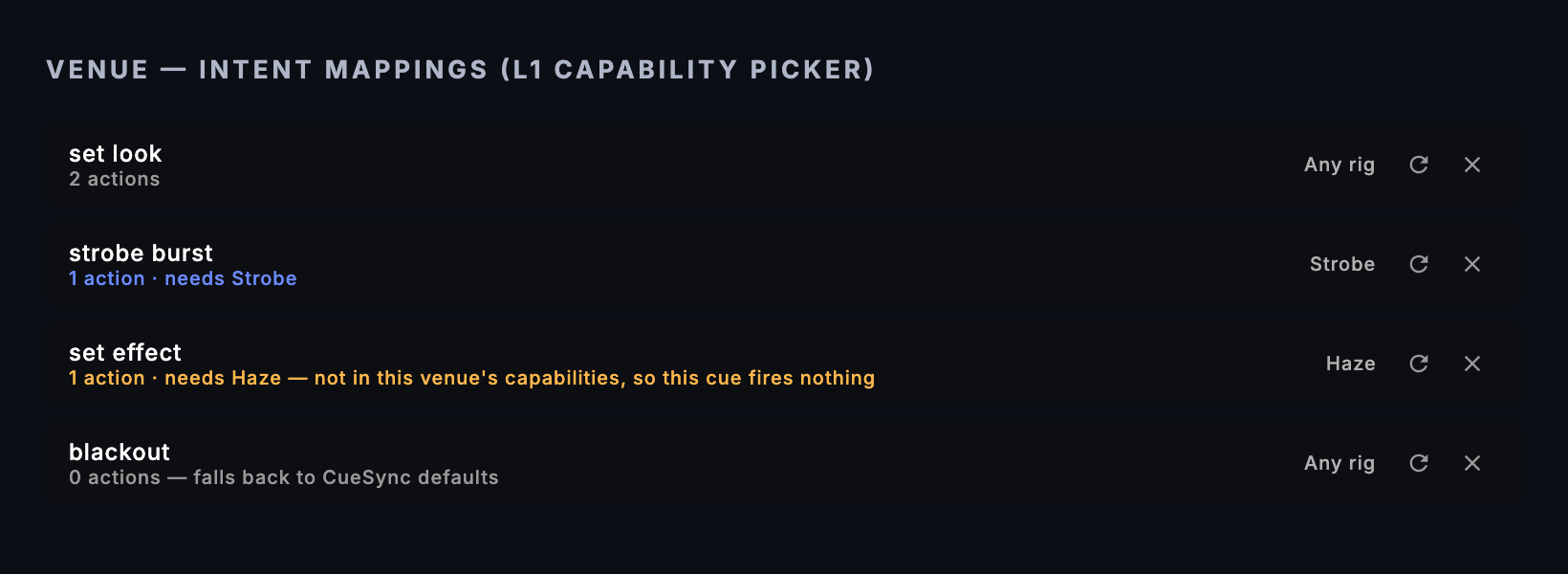
Each row in the venue editor has a capability picker (Any rig, or one of Moving Heads, LED Wash, Strobe, Haze, LED Wall, Projection, Laser, Fog, Pyro, Confetti), a Regenerate from current outputs button and a remove button. Let automation drive lasers in the same editor is off by default. It is the only thing that lets Blackout, Set Intensity and Set Effect reach a laser without your cue, and the only thing that lets AutoPilot fire a laser Look it picks by affinity (with it off, AutoPilot skips that Look and says so). Panic always reaches it, and a laser cue, pad or Look you fire yourself is never gated.
A mapping that ends up with nothing to fire is not skipped quietly. CueSync raises a warning ("This venue can't perform …") unless another entry in the same mapping still fires. The venue editor cannot add an action to a row: it can regenerate a row from the venue's outputs, guard it, or remove it. To put a specific action in a row, use Export on the venue, edit the JSON, and bring it back with Paste. See Venue Profiles.
Where intents come from
| Surface | What it does with intents | Edition |
|---|---|---|
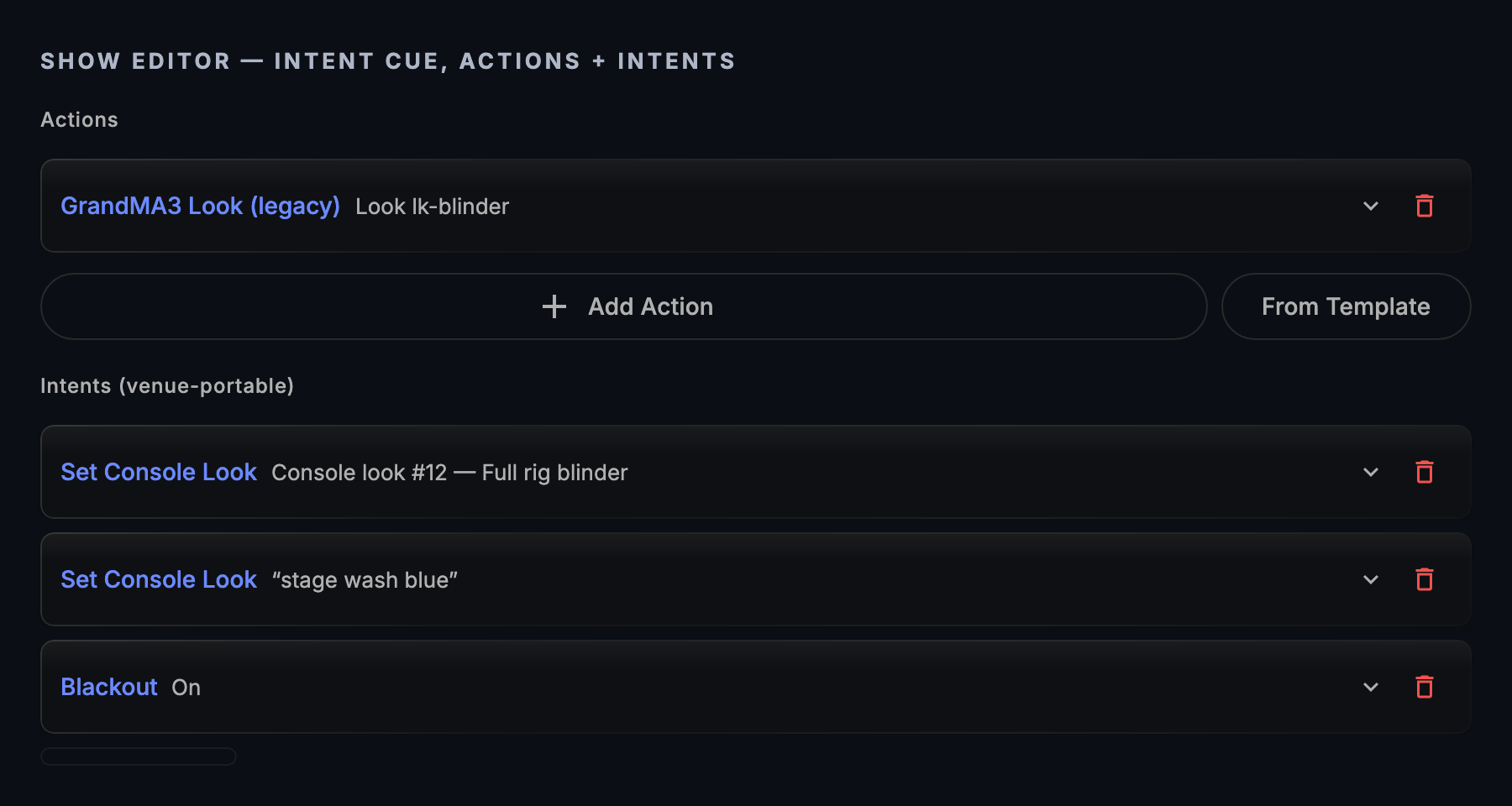
| Show Editor cue dialog | Intents (venue-portable), above Actions. Add Intent offers the eight. Resolved intents fire first, then the cue's own actions. | Theatre, Production |
| Auto Pilot profiles | A profile's Moment Intents are what fires at a drop, build or chorus. Built-in profiles are read-only: duplicate one. Your copy lets you set Chance to fire per intent. Your own Moment Actions are protocol-specific instead. Where a moment type has both, the intent wins. | DJ, Production |
| Show Themes | A theme is a phrase-by-phrase list of intents for Generate Show. + Add Intent offers Strobe burst, Set intensity, Set look, Effect and Blackout. | DJ, Production |
| Venue profiles | The rows and Look Bindings that decide what an intent means in a room | All |
| Cue stack cues and Cue Pads | Neither carries intents. A DJ cue holds actions. A pad holds one action. | — |
Generate Show fixes its actions when you commit. It resolves the theme's intents against the outputs connected at that moment, and the committed cues carry ordinary actions. If you commit with nothing connected, the cues arrive with no actions and CueSync says so in an error: "Generated N cues, but none of them can fire yet". Change venue, and generate again.
What NO OUT means
An intent is unsupported when it resolves to no action: nothing connected can do it, the venue's guard drops it, a named look has no binding, or nothing is connected at all. On screen its chip reads NO OUT, and CueSync says so rather than skipping it quietly.
- A Theatre cue still counts as fired. Its log entry reads NO OUT in Run Mode's activity log, with "N of M intent(s) unsupported by active venue profile". Any intent that did resolve still fires. If none did, the cue's follow actions are not scheduled, and CueSync reports that too.
- Auto Pilot raises a warning: "No connected output can perform "strobe burst" on this rig — cue skipped." once for each intent and rig, or "This venue can't perform "set effect" — no compatible output. Cue skipped." when a guard emptied the mapping.
- Named looks are checked before you start. Pressing Play in Run Mode shows "N look name(s) unbound at this venue", with the names and a Venue Settings button. It advises and never blocks GO. A name counts as bound when the venue has a Look Binding for it, or when a Look in the show's Palette carries that name. An enabled Palette Look of that name fires as itself, through its own routing and release, at a venue with no binding; a venue's Look Binding wins over it. A switched-off Look is skipped, because it would refuse to fire.
Chance to fire
Each intent has a chance to fire, 100% by default. Below 100%, CueSync rolls for each intent. A dropped roll fires nothing. It is Auto Pilot's only variance, and the slider (labelled Chance to fire, in 5% steps, reading "always" at 100%) is on each intent of a custom profile's Moment Intents card.
Left alone, the draw follows the track, the profile and the connected rig: the same track on the same rig under the same profile fires the same subset every time, and it does not change part-way through a track. A different rig is a different draw. Probability Seed → Lock Random Seed pins it, so the subset you approved in soundcheck is the subset that fires at the venue whatever is connected. Re-roll picks a different fixed subset. Each track keeps its own draw.
Chance to fire does nothing in a Theatre cue, where every intent fires. It also does nothing in Generate Show, which resolves intents once, at commit, with no draw; the Show Themes editor therefore has no probability control.
Which one do I use?
| I want… | Use | Why |
|---|---|---|
| A cue that works at whatever rig is connected | An intent in a Theatre cue, with the venue's rows set | The venue decides the commands |
| A DJ moment (a drop, a build) that adapts to the room | Intents in a Show Theme or an Auto Pilot profile | Cue stack cues and pads hold actions only |
| An exact desk command for this rig only | An action | It always sends what it says |
| A state I fire from many cues and pads, and may re-point mid-show | A Look | One edit re-points every user |
| Lighting, video and audio from one press | A Look Bundle, or one cue with several actions | Bundles fire their children together |
| Panic and track change to release it by itself | A Look | Tracked Looks are released by their own Off. Raw actions are not tracked. |
| A drop that varies from play to play | A custom Auto Pilot profile with Chance to fire below 100% | The only place the draw runs |
| One named look with a different desk cue in each room | Set Console Look with a Look name, plus Look Bindings | The name is the portable part |
| Something no intent covers | Raw Action, or a plain action beside the intents | Never remapped |
Use cases
1. A drop that works in any room (DJ).
- Open Settings → Show Themes. Under Built-in themes, click Duplicate on the theme closest to your style, name the copy and confirm.
- Under Your themes, click Edit on the copy. On the Drop card, click + Add Intent and choose Strobe burst. Add Set intensity as well and set its level to 100%.
- Click Save.
- Choose File ▸ Generate Show ▸ Generate Show from Track…, click your theme's card, review the draft and click Commit.
- Open Cues. In the group named Generated · followed by your theme's name and the time, the drop cue's trigger reads "Phrase → DROP (phrase N)" and its actions are the commands for the outputs you had connected. You should see actions for your own desks. Connect different gear later and the same cues do not change. Generate again.
2. A Look bound by name (touring).
- In the Show Editor, select a cue and choose Transport ▸ Show Control ▸ Edit Show Cue…. Under Intents (venue-portable), click Add Intent ▾ and choose Set Console Look. Expand it and type
stage wash bluein Look name (venue-bindable). Look # and Intensity % grey out with the note that the venue binding decides. - At the first venue, open Settings → Venues, open the venue and expand Look Bindings. Enter Look name
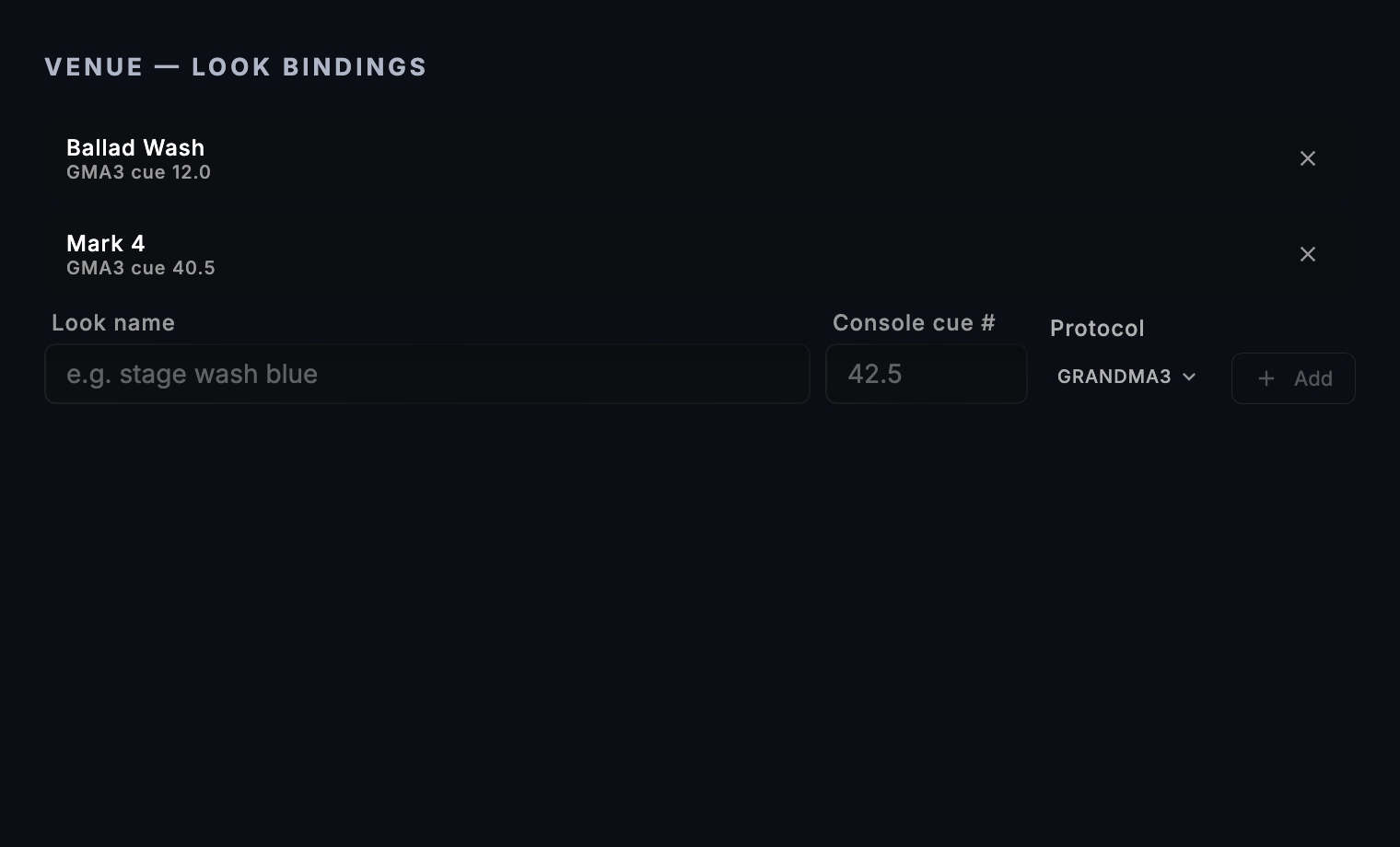
stage wash blueand Console cue #42.5, pick the Protocol, and click Add. Save the venue, then Activate it. - At a venue with an Eos, add the same Look name with cue
12and the ETC_EOS protocol. - In Run Mode, press Play. If a name has no binding, the banner "1 look name unbound at this venue" lists it. You should see the cue fire cue 42.5 on the first venue's console and cue 12 on the Eos, with no change to the show.
3. A laser cue that only fires where the room has a laser. This assumes your touring base profile already has a set effect row that holds a Pangolin Beyond action. The editor cannot add an action to a row, so put it there once by exporting the profile, editing the JSON and pasting it back.
- Open Settings → Venues and the base profile. Under Intent Mappings, open the capability picker on the set effect row and choose Laser. The row reads "needs Laser". Save.
- Click New Venue for a club with no laser. In Info, set Inherits from to the base profile. Intent Mappings now reads "(0 + N inherited)". Add the club's outputs. Under Capabilities, leave Laser off.
- The inherited set effect row turns amber: "needs Laser — not in this venue's capabilities, so this cue fires nothing". Save and Activate.
- Make a second venue for an arena with a laser. Inherit from the same base, add its outputs and tick Laser. Save and Activate. You should see a Set Effect intent fire nothing at the club, with the warning "This venue can't perform "set effect" — no compatible output. Cue skipped.", and fire the laser cue at the arena. Let automation drive lasers is a separate switch. It only governs what the built-in defaults, and a venue's house state, may do to a laser. A laser action you put in a mapping yourself is not gated by it.
4. A Theatre cue authored as an intent.
- In Show Editor, select a cue and choose Transport ▸ Show Control ▸ Edit Show Cue… (or add one with Add Show Cue…). Under Intents (venue-portable) click Add Intent ▾ and choose Set Console Look. Expand it, set Look # to
12and Description toFull rig blinder. - Click Add Intent ▾ again and choose Set Visual. Set Clip # to
3, Layer to2and Opacity % to100. - Save the cue. In the inspector, set its trigger mode: Timecode, Manual, Follow or Auto.
- Run the show and fire the cue. Open the activity log in Run Mode. You should see the consoles go to look 12 and Resolume play clip 3 on layer 2, from the one cue, provided the active venue has no set look or set visual row that overrides the defaults. On a rig with no Resolume the look still fires, and the log entry reads NO OUT with "1 of 2 intent(s) unsupported by active venue profile".
Tips & gotchas
- The Look # only matters when there is no mapping. Once a venue has a set look row, every numbered Set Console Look fires that row's action.
- Art-Net and sACN read the Look # as a channel. On a rig with only DMX outputs, Set Console Look #5 writes channel 5 at the intensity.
- Blackout ON and OFF are different intents. Restore exists only for protocols that publish one. Panic is a separate mechanism with its own verbs. See How CueSync Works.
- Regenerate replaces a row. It rewrites one intent's actions from the venue's current outputs and clears any guard on that row.
- Energy scaling applies to Auto Pilot and Generate Show, using the live or per-phrase energy. Theatre cues use full energy.
- Suggested cues in Track Prep and the suggestion panel are also built from intents and resolved against the connected rig when they are created.
- The word "look" appears three times. A console look number is the Look # in Set Console Look. A Look is a Palette item. A look name is what you bind at a venue.
Before you rely on it
The command each intent sends is built to the manufacturer's published interface. The grandMA3, Resolume and QLab defaults have been run against the real console or software. The Eos, MagicQ, Avolites, disguise, Pixera, VIOSO, MSC, Art-Net and sACN defaults have not been run on real gear. Do a dry run of a new venue before doors; Desk Verification has a checklist for proving your own desk.
Related
- How CueSync Works — the whole path and every capability
- Cues, Pads or Scenes? — choosing between the three
- Palette — Looks
- Venue Profiles — the venue editor
- Auto Pilot — profiles and moments
- Generate Show — themes
- Show Editor — Theatre cues
- Action Reference, What Each Action Can Send
Looking for a quick fix?
The Help Center has short task-focused articles and a support team that responds within 24 hours.