disguise
AllWhat it's for — CueSync controls a disguise d3, vx or gx server over OSC. It recalls cues by number, plays, stops and loops the timeline, moves between sections and tracks, sets the master brightness and volume, and fades the master up and down. It reaches disguise's show-control surface and nothing else: there is no layer, timeline-seek or transport-speed control over OSC. CueSync has never been run against a d3, vx or gx. It is built to disguise's published interface. Read the last section before you rely on it.
1 · Connect d3
In d3 — an OSC device and an OSC Event Transport
d3 only listens for CueSync after you have set up an OSC Event Transport and engaged it. disguise's help describes the steps like this:
- Create an OSC device. disguise's OSC Device page describes its settings. disguise's OSC help gives no default port, so choose the receiving port there and type the same number into CueSync.
- Right-click Transport in the dashboard. That opens the Transport Manager. Expand Event Transports, click +, name it, and choose EventTransportOSC.
- At the top of the OSC Event Transport editor, select the OSC device from step 1.
- In the transport window, click Disengaged. It changes to Engaged and flashes green. Until then no transport control is live.
Two things in d3 decide whether CueSync's messages land:
- The addresses. The OSC Event Transport starts with a standard set of
/d3/showcontrol/…addresses, and d3 lets you change every one during show setup. CueSync always sends the standard ones. If someone renamed them, nothing fires. - The argument rule. A command triggers when a message arrives on its address with no arguments, or with any number of arguments, but a single float argument must be exactly 1.0. CueSync sends the transport verbs with no arguments, so this does not bite. It matters if you send one through Raw.
(CueSync's own hint in the Add Output dialog says to configure OSC input "under Transport Controls". disguise's help calls the window the Transport Manager, reached by right-clicking Transport.)
In CueSync
- Network → Outputs → Add Output. Under Category, pick Video, then disguise d3 (d3/gx OSC).
- Give it a Name. Enter the d3 machine's Host / IP Address.
- Set Port to the number d3 listens on. It starts at 3031.
- Click Add Output.
What "connected" means for disguise. disguise is UDP, and d3 sends nothing CueSync listens to. The output is green while the d3 machine answers a network ping, checked regularly. That proves the machine is on the network. It does not prove that d3 is running, that a project is loaded, that the transport is engaged, or that the port is right. Test Connection is the same ping. If your network or the machine drops ping, the output reads down even though OSC would arrive. After several misses in a row it goes down, and a cue is only ever sent to a connected output.
Every send is UDP. A green cue means the packet left this machine.
Timing. The output's Pre-fire (ms) and Latency comp (ms) (0–500) work as on any output. OSC timetags are not offered for disguise.
More than one d3. An action with no output chosen goes to the first connected disguise output. Tick Send to every disguise output on the action to reach all of them.
2 · What a disguise action can do
Add an action to a cue or a Cue Pad. From Add Action, pick the d3 output, then disguise. The editor is built from a Transport picker, a Navigation picker, a Fade picker and two level boxes.
| Editor control | What d3 receives |
|---|---|
| Transport → Play | /d3/showcontrol/play |
| Transport → Pause | /d3/showcontrol/stop |
| Transport → Stop | /d3/showcontrol/stop |
| Transport → Play Section | /d3/showcontrol/playsection |
| Transport → Loop Section | /d3/showcontrol/loop |
| Transport → Return to Start | /d3/showcontrol/returntostart |
| Transport → Goto Cue, a whole number in Cue (d3 cue number, e.g. 3 or 1.10) | /d3/showcontrol/cue <int> |
| Transport → Goto Cue, a number with a decimal point | /d3/showcontrol/floatcue <float> |
| Navigation → Next Section, Previous Section, Next Track, Previous Track | /nextsection, /previoussection, /nexttrack, /previoustrack under /d3/showcontrol |
| Fade → Fade Down or Fade Up | /d3/showcontrol/fadedown or /d3/showcontrol/fadeup |
| Master brightness % (0–100) | /d3/showcontrol/brightness with 0.0–1.0 |
| Master volume % (0–100) | /d3/showcontrol/volume with 0.0–1.0 |
| Transport → Raw OSC: Raw OSC Address (Power Mode) and Raw Arguments (comma-separated) | your address and arguments, verbatim. Each argument is sent as an integer if it reads as one, else a float, else text. |
None of the transport, navigation and fade messages carries an argument.
Pause and Stop are the same message. disguise publishes no pause address, so CueSync's Pause sends /d3/showcontrol/stop, and so does Stop. CueSync's reading is that d3's stop holds the playhead where it is and Return to Start rewinds. disguise's help does not say whether stop holds or resets, so try it on your d3 before you build on it.
A decimal cue is one number to d3. d3 reads a floatcue to two decimal places, so 1.1 and 1.10 are the same cue, and only sub-cue numbers 0 to 99 can be called this way. /d3/showcontrol/cue takes whole numbers (d3 accepts up to three, as a dotted number, but CueSync sends one). d3 looks the cue up according to the transport's cue behaviour (local track or set list).
The collapsed action row shows what will fire, for example Cue 3 · Play, Stop or Fade Down.
What one action sends
- Raw is exclusive. With a raw address set, CueSync sends that message and nothing else. Choosing any transport mode clears the raw address in the editor.
- Stop is a hard override. A Stop action sends only
/stop. The levels, fades and navigation on it are dropped. - Otherwise one action sends several messages, back to back, in this order: the cue recall, one transport verb, one navigation verb, the brightness, the volume, then the fade (Fade Down wins if both are set). Each is its own UDP packet, not a bundle. Goto Cue carries a Hold / Play / Pause choice: Hold recalls the cue and sends no transport verb, Play recalls it and rolls, Pause recalls it and sends
/stop. - An action with nothing set fails with Disguise action has no operation set.
What is not available
Layer opacity, layer enable, 3D position, timeline seek and transport speed are not available over disguise OSC. disguise publishes no address for them, and the editor does not offer them. A show saved by an older version may still carry one. Such a cue sends the messages it can, then reports failure, naming what it could not send (not available over disguise OSC: …). Use Raw OSC to reach an OSC Machine Control endpoint you have mapped yourself.
3 · Looks, pads, intents, fades
Looks
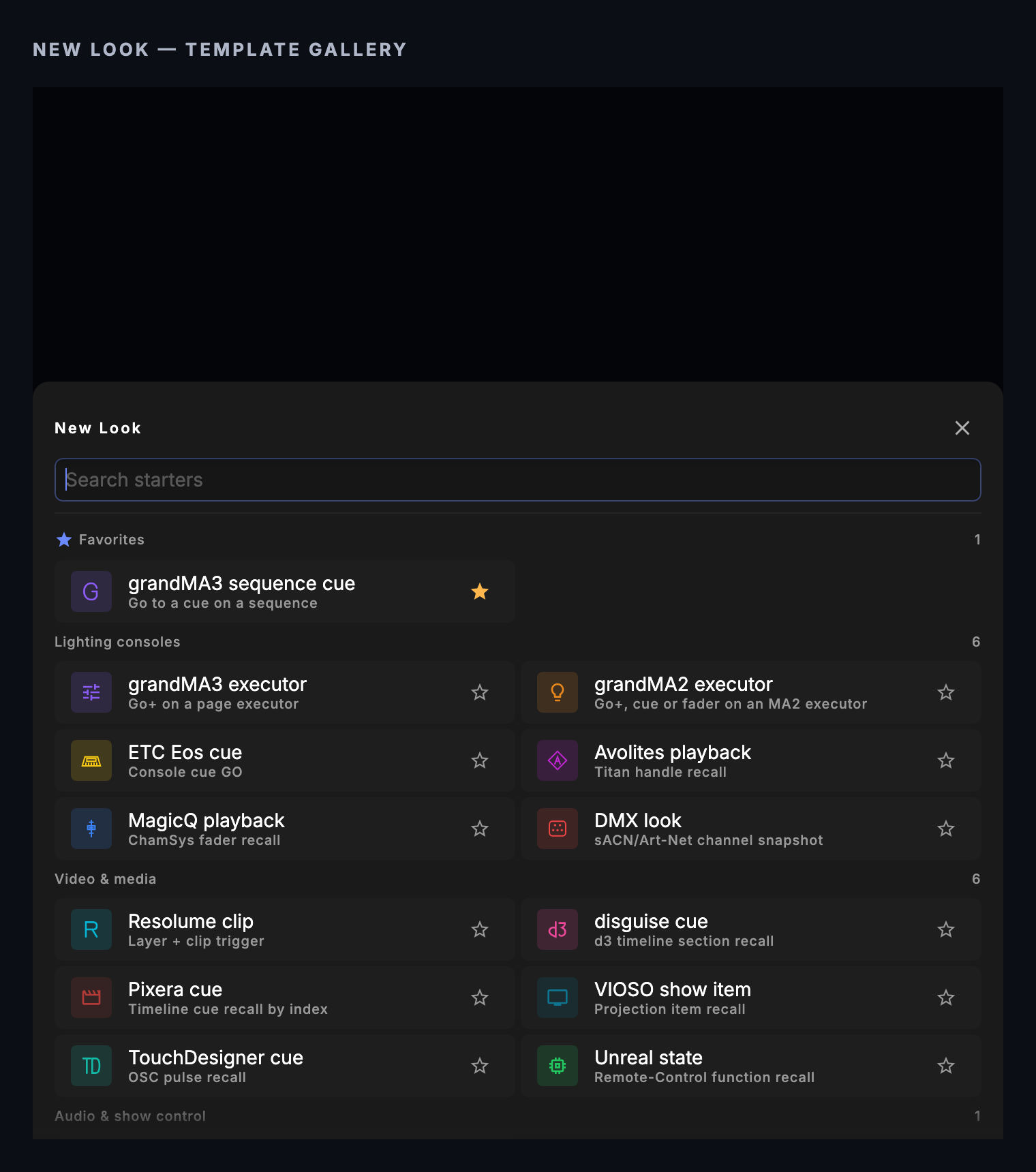
In the Palette, + New Look → Video & media → disguise cue (d3 timeline section recall). The single field is Cue number, a whole number from 0. The Look sends the cue and a play, because a section that lands paused is dead air on a Look surface. d3's decimal cues are not reachable from this field. Use an Any action Look holding a disguise action.
| Look | Fires | Released by panic, track change or a release group |
|---|---|---|
| disguise cue | /cue <n> then /play | /d3/showcontrol/stop |
| Any action with a cue, Play, Play Section or Loop Section | the whole action | /d3/showcontrol/stop |
| Any action with Fade Down | the whole action | /d3/showcontrol/fadeup |
| Any action with Pause, Stop, Raw, or navigation, levels and Fade Up alone | the whole action | nothing |
A Look release halts the whole d3 timeline, not just the section the Look started. The tile reads SENT: CueSync gets nothing back from d3.
Cue Pads
Templates (on the bank tab bar) has a disguise section: Play, Pause, Stop and Go To Cue (cue 1). Repoint Go To Cue at the cue you mean.
Intents
Intent cues (Theatre Show Editor) and Auto Pilot moments reach d3 according to the output's role in the venue profile. No role, or Custom, takes every intent. Video Server takes Set Visual, Clear Visual and Set Effect. Every role takes Blackout.
| Intent | What d3 receives |
|---|---|
| Set Visual (Clip #) | /cue <Clip #> only. No play is sent. The layer and opacity have no disguise form and are dropped. |
| Set Console Look (N) | /cue N only, with no play |
| Go Show Cue (Cue #) | a whole number: /cue then /play. A number with a decimal point: /floatcue then /play. |
| Blackout | /fadedown, and its restore is /fadeup |
| Set Intensity | /brightness, scaled by the energy level |
| Clear Visual, Strobe Burst, Set Effect | nothing: disguise has no address for them |
Auto Pilot's CUT transition opens its gap with Fade Down and closes it with Fade Up. Auto Pilot below full energy, and a soft velocity pad, scale Master brightness %.
Fades and feedback
There is no Fade action target for disguise. The master fade is the /fadedown and /fadeup triggers, and how long a fade takes is d3's setting, not CueSync's. CueSync sends only. It does not listen to d3's OSC output messages, so it cannot tell what d3 is doing.
Timecode
d3 takes timecode over LTC or MTC, not OSC, so disguise is not a target in Timecode → Output Routing. Route d3 from an LTC or MTC leg. See Timecode.
4 · Panic
Blackout on the EdgeBar (or the blackout shortcut) and the Blackout All pad send /d3/showcontrol/stop to every connected d3. That is a stop, not a black: brightness is untouched, so a running fade or a bright master stays as it was. The Auto Pilot CUT gap uses the fade instead.
Releasing panic does nothing for d3. The timeline stays stopped, and a fade you started stays where it landed. Play from a cue or pad, and fade up if you faded down.
When d3 drops out. An action aimed at an output that is not connected fails and is not queued. Nothing is replayed on reconnect.
Use cases
1. Recall a section by cue number and roll it
- On the Cues screen, click
+. Name the cue Verse. - Add an action from the d3 output, then disguise. Set Transport to Goto Cue, type
3in Cue (d3 cue number, e.g. 3 or 1.10), and choose Play. - Test-fire the cue.
The row reads Cue 3 · Play. d3 should get /d3/showcontrol/cue 3 and then /d3/showcontrol/play, and jump to cue 3 and run. If nothing moves, check that the OSC Event Transport is Engaged in d3.
2. Recall a decimal cue and hold
- Add a cue Verse 1.10. Add a disguise action, Transport → Goto Cue, cue
1.10, and leave the choice on Hold. - Test-fire it.
d3 should get /d3/showcontrol/floatcue 1.1 and recall the cue without rolling the timeline. Typing 1.1 sends the same message.
3. Fade the master down and back up
- Add a cue House fade down with a disguise action. Leave Transport on None and set Fade to Fade Down. The row reads
Fade Down. - Add a cue House fade up with Fade Up.
- Test-fire them in turn.
d3's master brightness should fade down and up. The length of the fade is d3's. Setting Master brightness % to 60 on the second action sends /brightness 0.6 just before the fade-up trigger.
4. Check the panic before doors
- With the timeline playing in d3, click Blackout on the EdgeBar.
- Watch the timeline, then release the blackout.
The timeline should stop and stay stopped after the release. Fire your Play cue to start it. If it did not stop, the ping may be passing while d3's transport is not engaged.
Tips & gotchas
- A green output proves only that the machine answers a ping. The transport, the project and the port are all unchecked. Test with a Play pad and watch the timeline.
- Engage the transport. An OSC Event Transport that reads Disengaged ignores everything.
- Standard addresses only. If the show renamed the transport's addresses, CueSync's messages match nothing.
- Pause is Stop. Both send
/stop. Rewind is Return to Start. - Set Visual and Set Console Look recall without playing. A recalled section lands however d3 handles a recall while stopped. The Look and Go Show Cue add a play.
- A Look release stops the whole timeline. Do not put a Look in a release group if another section must keep running.
- Limits of one action. An action sends at most one cue recall, one transport verb, one navigation verb and one fade, plus the two levels. It cannot send two transport verbs.
- An old show can carry dead fields. A layer or seek field sends what it can and then goes red. Remove it or use Raw.
- Panic stops; it does not black. Keep a fade-down cue.
- The Cues screen sends actions together. Put a Wait action between two actions when order matters. A Theatre cue sends them in list order.
What has been checked
disguise support follows disguise's published OSC interface and has not been proven on a live d3, vx or gx. Do a dry run with the transport engaged before you rely on a cue.
Related
- Network Outputs — Adding, testing and monitoring outputs
- Looks — Building Looks, disguise cues included
- Cues — Adding actions and Waits to cues
- Cue Pads — The disguise pad templates
- Intents and Actions — How intents reach each rig
- Venue Profiles — Output roles
- Timecode — Route d3's clock over LTC or MTC
- What Each Action Can Send — The verb list per action
- Protocol Reference — Ports and connection behaviour
- Resolume, Pixera and VIOSO — The other video servers
Looking for a quick fix?
The Help Center has short task-focused articles and a support team that responds within 24 hours.